Ecosystem
All entries on this page were added by people who worked on these and thus self-identified as being part of the Project Capsule Ecosystem.
Integrations
Capsule works well with other CNCF kubernetes based solutions. Below you can see the ones we have documented. In the end it can work with any solution, due to Capsule’s kubernetes native approach:
Addons
Addons are separate projects which interact with the core Capsule Project. Since our commitment is, to have a stable core API we decided to push towards an addon based ecosystem. If you have a new addon, which interacts with the capsule core project, consider adding the addon.
Proxy
core
ux
Enhance the user experience by allowing users to query the Kubernetes API and only getting the results, they are supposed to get.
Rancher
community
ux
Integrate Capsule with Rancher to manage Capsule Tenants and their resources with Rancher Projects.
ArgoCD
vendor
gitops
This addon is designed for kubernetes administrators, to automatically translate their existing Capsule Tenants into Argo Appprojects.
Sops Operator
core
secrets
gitops
Handle SOPS Secrets in a multi-tenant and kubernetes-native way.
FluxCD
core
gitops
In particular enables Tenants to manage their resources, including creating Namespaces.
Cortex Proxy
core
observability
Route metrics to cortex organizations based on the relational of namespace metrics to capsule tenants.
1 - Integrations
Integrate Capsule with other platforms and solutions
1.1 - ArgoCD
Capsule Integration with ArgoCD
Integration
Resource Actions
You may provide Custom Resource Actions for Capsule specific resources and interactions.
Namespace Resource Actions
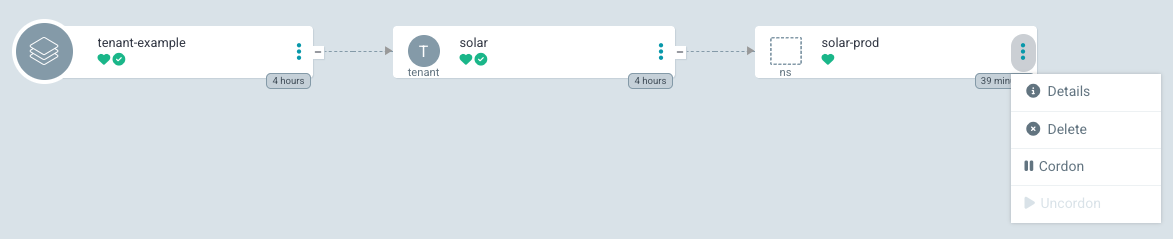
With the following configuration, ArgoCD will show Cordon and Resume actions for the Namespace resource. The Cordon action will set the projectcapsule.dev/cordoned label to true, while the Resume action will set it to false. This is only for Namespaces part of a Capsule Tenant.
resource.customizations.actions.Namespace: |
  mergeBuiltinActions: true
  discovery.lua: |
    actions = {
      cordon = {
        iconClass = "fa fa-solid fa-pause",
        disabled = true,
      },
      uncordon = {
        iconClass = "fa fa-solid fa-play",
        disabled = true,
      },
    }

    local function has_managed_ownerref()
      if obj.metadata == nil or obj.metadata.ownerReferences == nil then
        return false
      end

      for _, ref in ipairs(obj.metadata.ownerReferences) do
        if ref.kind == "Tenant" and ref.apiVersion == "capsule.clastix.io/v1beta2" then
          return true
        end
      end

      return false
    end
    if not has_managed_ownerref() then
      return {}
    end
    local labels = {}
    if obj.metadata ~= nil and obj.metadata.labels ~= nil then
      labels = obj.metadata.labels
    end

    local cordoned = labels["projectcapsule.dev/cordoned"] == "true"

    if cordoned then
      actions["uncordon"].disabled = false
    else
      actions["cordon"].disabled = false
    end

    return actions

  definitions:
    - name: cordon
      action.lua: |
        if obj.metadata == nil then
          obj.metadata = {}
        end
        if obj.metadata.labels == nil then
          obj.metadata.labels = {}
        end

        obj.metadata.labels["projectcapsule.dev/cordoned"] = "true"
        return obj

    - name: uncordon
      action.lua: |
        if obj.metadata ~= nil and obj.metadata.labels ~= nil then
          obj.metadata.labels["projectcapsule.dev/cordoned"] = "false"
        end
        return obj
Tenant Resource Actions
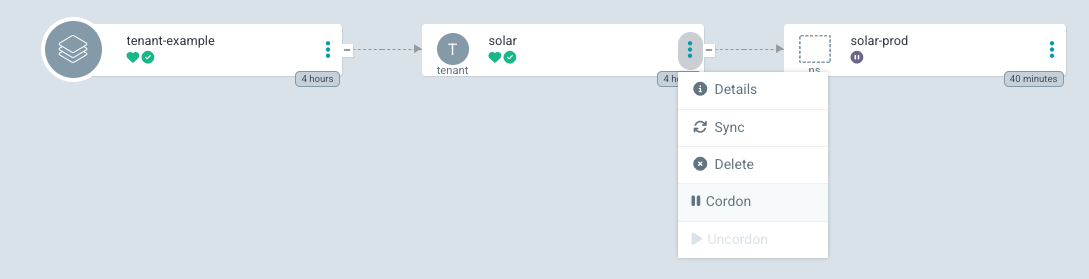
With the following configuration, ArgoCD will show Cordon and Resume actions for the Tenant resource. The Cordon action will set the spec.cordon field to true, while the Resume action will set it to false.
resource.customizations.actions.capsule.clastix.io_Tenant: |
  mergeBuiltinActions: true
  discovery.lua: |
    actions = {}
    actions["cordon"] = {
      ["iconClass"] = "fa fa-solid fa-pause",
      ["disabled"] = true,
    }
    actions["uncordon"] = {
      ["iconClass"] = "fa fa-solid fa-play",
      ["disabled"] = true,
    }

    local suspend = false
    if obj.spec ~= nil and obj.spec.cordoned ~= nil then
      suspend = obj.spec.cordoned
    end

    if suspend then
      actions["uncordon"]["disabled"] = false
    else
      actions["cordon"]["disabled"] = false
    end

    return actions

  definitions:
    - name: cordon
      action.lua: |
        if obj.spec == nil then
          obj.spec = {}
        end
        obj.spec.cordoned = true
        return obj

    - name: uncordon
      action.lua: |
        if obj.spec ~= nil and obj.spec.cordoned ~= nil and obj.spec.cordoned then
          obj.spec.cordoned = false
        end
        return obj
TenantResource and GlobalTenantResource Actions
With the following configuration, ArgoCD will show Cordon, Uncordon, and Reconcile actions for TenantResource and GlobalTenantResource. Cordoning pauses all apply and delete operations. The Reconcile action triggers an immediate reconcile by setting the reconcile.projectcapsule.dev/requestedAt annotation. Both Cordon and Reconcile are disabled when the resource is already cordoned, since the controller skips processing in that state.
resource.customizations.actions.capsule.clastix.io_TenantResource: |
  mergeBuiltinActions: true
  discovery.lua: |
    local actions = {}
    actions["cordon"] = {
      ["iconClass"] = "fa fa-fw fa-pause",
      ["disabled"] = true,
    }
    actions["uncordon"] = {
      ["iconClass"] = "fa fa-fw fa-play",
      ["disabled"] = true,
    }
    actions["reconcile"] = {
      ["iconClass"] = "fa fa-fw fa-rotate-right",
      ["disabled"] = true,
    }

    local cordoned = false
    if obj.spec ~= nil and obj.spec.cordoned ~= nil then
      cordoned = obj.spec.cordoned
    end

    if cordoned then
      actions["uncordon"]["disabled"] = false
    else
      actions["cordon"]["disabled"] = false
      actions["reconcile"]["disabled"] = false
    end

    return actions

  definitions:
    - name: cordon
      action.lua: |
        if obj.spec == nil then
          obj.spec = {}
        end
        obj.spec.cordoned = true
        return obj

    - name: uncordon
      action.lua: |
        if obj.spec ~= nil and obj.spec.cordoned ~= nil and obj.spec.cordoned then
          obj.spec.cordoned = false
        end
        return obj

    - name: reconcile
      action.lua: |
        local os = require("os")
        if obj.metadata.annotations == nil then
          obj.metadata.annotations = {}
        end
        obj.metadata.annotations["reconcile.projectcapsule.dev/requestedAt"] = os.date("!%Y-%m-%dT%XZ")
        return obj
Apply the same block for GlobalTenantResource by replacing the resource key:
resource.customizations.actions.capsule.clastix.io_GlobalTenantResource: |
  # same content as above
Resource Health
You may provide Custom Resource Health for Capsule specific resources and interactions.
Tenant Resource Health

Shows Suspended when the Tenant is cordoned, reflecting that no new workloads can be scheduled in its Namespaces. Reports Degraded when the Ready condition is False, Healthy when Ready is True, and Progressing otherwise.
resource.customizations.health.capsule.clastix.io_Tenant: |
  local hs = {}
  if obj.status == nil or obj.status.conditions == nil then
    hs.status = "Progressing"
    hs.message = "Waiting for status"
    return hs
  end

  if obj.metadata ~= nil and obj.metadata.generation ~= nil and obj.status.observedGeneration ~= nil
      and obj.status.observedGeneration ~= obj.metadata.generation then
    hs.status = "Progressing"
    hs.message = "Waiting for reconciliation (generation mismatch)"
    return hs
  end

  for _, condition in ipairs(obj.status.conditions) do
    if condition.type == "Cordoned" and condition.status == "True" then
      hs.status = "Suspended"
      hs.message = condition.message
      return hs
    end
  end

  for _, condition in ipairs(obj.status.conditions) do
    if condition.type == "Ready" and condition.status == "False" then
      hs.status = "Degraded"
      hs.message = condition.message
      return hs
    end
    if condition.type == "Ready" and condition.status == "True" then
      hs.status = "Healthy"
      hs.message = condition.message
      return hs
    end
  end

  hs.status = "Progressing"
  hs.message = "Waiting for Ready condition"
  return hs
Namespace Resource Health
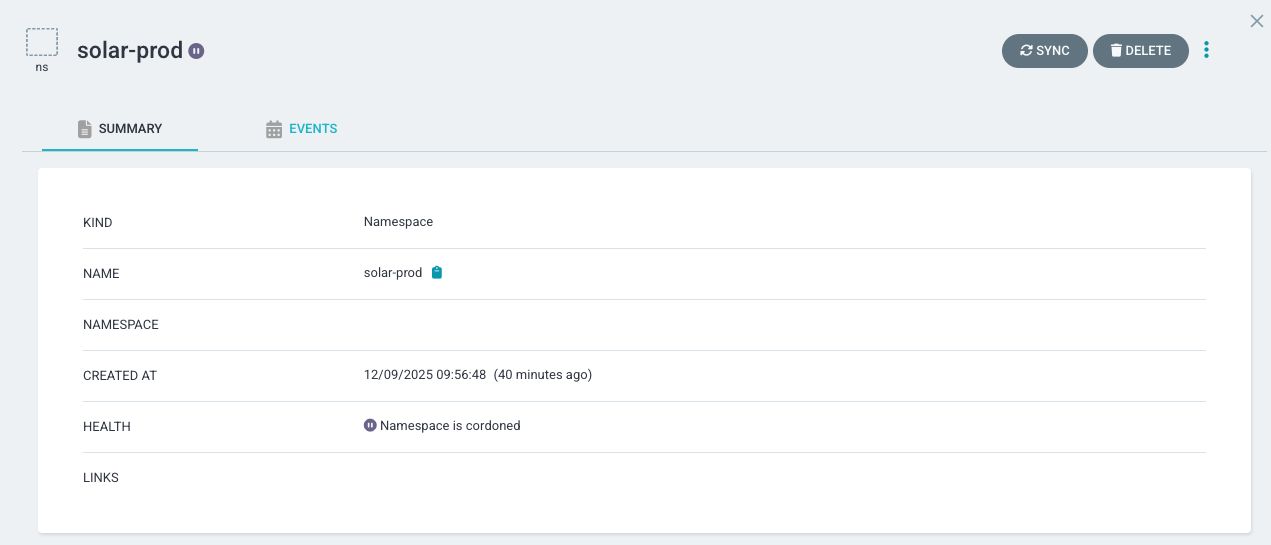
Suspends a Namespace when it’s Cordoned. This is only for Namespaces part of a Capsule Tenant.
resource.customizations.health.Namespace: |
  local hs = {}
  local function has_managed_ownerref()
    if obj.metadata == nil or obj.metadata.ownerReferences == nil then
      return false
    end

    for _, ref in ipairs(obj.metadata.ownerReferences) do
      if ref.kind == "Tenant" and ref.apiVersion == "capsule.clastix.io/v1beta2" then
        return true
      end
    end

    return false
  end

  local labels = {}
  if obj.metadata ~= nil and obj.metadata.labels ~= nil then
    labels = obj.metadata.labels
  end

  local cordoned = labels["projectcapsule.dev/cordoned"] == "true"

  if cordoned and has_managed_ownerref() then
    hs.status = "Suspended"
    hs.message = "Namespace is cordoned (tenant-managed)"
    return hs
  end

  if obj.status ~= nil and obj.status.phase ~= nil then
    if obj.status.phase == "Active" then
      hs.status = "Healthy"
      hs.message = "Namespace is Active"
      return hs
    else
      hs.status = "Progressing"
      hs.message = "Namespace phase is " .. obj.status.phase
      return hs
    end
  end

  hs.status = "Progressing"
  hs.message = "Waiting for Namespace status"
  return hs
CapsuleConfiguration Resource Health
Reports health based on the Ready condition.
resource.customizations.health.capsule.clastix.io_CapsuleConfiguration: |
  local hs = {}
  if obj.status == nil or obj.status.conditions == nil then
    hs.status = "Progressing"
    hs.message = "Waiting for status"
    return hs
  end

  if obj.metadata ~= nil and obj.metadata.generation ~= nil and obj.status.observedGeneration ~= nil
      and obj.status.observedGeneration ~= obj.metadata.generation then
    hs.status = "Progressing"
    hs.message = "Waiting for reconciliation (generation mismatch)"
    return hs
  end

  for _, condition in ipairs(obj.status.conditions) do
    if condition.type == "Ready" and condition.status == "False" then
      hs.status = "Degraded"
      hs.message = condition.message
      return hs
    end
    if condition.type == "Ready" and condition.status == "True" then
      hs.status = "Healthy"
      hs.message = condition.message
      return hs
    end
  end

  hs.status = "Progressing"
  hs.message = "Waiting for Ready condition"
  return hs
TenantOwner Resource Health
Reports Degraded when the TenantOwner failed to reconcile, and Healthy when the owner has been successfully bound to its tenant.
resource.customizations.health.capsule.clastix.io_TenantOwner: |
  local hs = {}
  if obj.status == nil or obj.status.conditions == nil then
    hs.status = "Progressing"
    hs.message = "Waiting for status"
    return hs
  end

  if obj.metadata ~= nil and obj.metadata.generation ~= nil and obj.status.observedGeneration ~= nil
      and obj.status.observedGeneration ~= obj.metadata.generation then
    hs.status = "Progressing"
    hs.message = "Waiting for reconciliation (generation mismatch)"
    return hs
  end

  for _, condition in ipairs(obj.status.conditions) do
    if condition.type == "Ready" and condition.status == "False" then
      hs.status = "Degraded"
      hs.message = condition.message
      return hs
    end
    if condition.type == "Ready" and condition.status == "True" then
      hs.status = "Healthy"
      hs.message = condition.message
      return hs
    end
  end

  hs.status = "Progressing"
  hs.message = "Waiting for Ready condition"
  return hs
ResourcePool Resource Health
Reports Degraded when any resource is exhausted or not ready, and Healthy when the pool is active and within limits.
resource.customizations.health.capsule.clastix.io_ResourcePool: |
  local hs = {}
  if obj.status == nil or obj.status.conditions == nil then
    hs.status = "Progressing"
    hs.message = "Waiting for status"
    return hs
  end

  if obj.metadata ~= nil and obj.metadata.generation ~= nil and obj.status.observedGeneration ~= nil
      and obj.status.observedGeneration ~= obj.metadata.generation then
    hs.status = "Progressing"
    hs.message = "Waiting for reconciliation (generation mismatch)"
    return hs
  end

  if obj.status.exhaustions ~= nil then
    local exhausted = {}
    for resource, _ in pairs(obj.status.exhaustions) do
      table.insert(exhausted, resource)
    end
    table.sort(exhausted)
    if #exhausted > 0 then
      hs.status = "Degraded"
      hs.message = "Pool exhausted for: " .. table.concat(exhausted, ", ")
      return hs
    end
  end

  for _, condition in ipairs(obj.status.conditions) do
    if condition.type == "Ready" and condition.status == "False" then
      hs.status = "Degraded"
      hs.message = condition.message
      return hs
    end
    if condition.type == "Ready" and condition.status == "True" then
      hs.status = "Healthy"
      hs.message = condition.message
      return hs
    end
  end

  hs.status = "Progressing"
  hs.message = "Waiting for Ready condition"
  return hs
ResourcePoolClaim Resource Health
Reports Suspended when unbound (waiting for a pool), Degraded when not ready, and Healthy when bound and ready.
resource.customizations.health.capsule.clastix.io_ResourcePoolClaim: |
  local hs = {}
  if obj.status == nil or obj.status.conditions == nil then
    hs.status = "Progressing"
    hs.message = "Waiting for status"
    return hs
  end

  if obj.metadata ~= nil and obj.metadata.generation ~= nil and obj.status.observedGeneration ~= nil
      and obj.status.observedGeneration ~= obj.metadata.generation then
    hs.status = "Progressing"
    hs.message = "Waiting for reconciliation (generation mismatch)"
    return hs
  end

  for _, condition in ipairs(obj.status.conditions) do
    if condition.type == "Bound" and condition.status == "False" then
      hs.status = "Suspended"
      hs.message = condition.message
      return hs
    end
  end

  for _, condition in ipairs(obj.status.conditions) do
    if condition.type == "Ready" and condition.status == "False" then
      hs.status = "Degraded"
      hs.message = condition.message
      return hs
    end
    if condition.type == "Ready" and condition.status == "True" then
      hs.status = "Healthy"
      hs.message = condition.message
      return hs
    end
  end

  hs.status = "Progressing"
  hs.message = "Waiting for Ready condition"
  return hs
CustomQuota Resource Health
Reports Degraded when the quota reconciliation failed (e.g. a matched resource has a missing field), and Healthy when usage has been successfully calculated for the namespace.
resource.customizations.health.capsule.clastix.io_CustomQuota: |
  local hs = {}
  if obj.status == nil or obj.status.conditions == nil then
    hs.status = "Progressing"
    hs.message = "Waiting for status"
    return hs
  end

  if obj.metadata ~= nil and obj.metadata.generation ~= nil and obj.status.observedGeneration ~= nil
      and obj.status.observedGeneration ~= obj.metadata.generation then
    hs.status = "Progressing"
    hs.message = "Waiting for reconciliation (generation mismatch)"
    return hs
  end

  for _, condition in ipairs(obj.status.conditions) do
    if condition.type == "Ready" and condition.status == "False" then
      hs.status = "Degraded"
      hs.message = condition.message
      return hs
    end
    if condition.type == "Ready" and condition.status == "True" then
      hs.status = "Healthy"
      hs.message = condition.message
      return hs
    end
  end

  hs.status = "Progressing"
  hs.message = "Waiting for Ready condition"
  return hs
GlobalCustomQuota Resource Health
Reports Degraded when the quota reconciliation failed, and Healthy when usage has been successfully calculated across all selected namespaces.
resource.customizations.health.capsule.clastix.io_GlobalCustomQuota: |
  local hs = {}
  if obj.status == nil or obj.status.conditions == nil then
    hs.status = "Progressing"
    hs.message = "Waiting for status"
    return hs
  end

  if obj.metadata ~= nil and obj.metadata.generation ~= nil and obj.status.observedGeneration ~= nil
      and obj.status.observedGeneration ~= obj.metadata.generation then
    hs.status = "Progressing"
    hs.message = "Waiting for reconciliation (generation mismatch)"
    return hs
  end

  for _, condition in ipairs(obj.status.conditions) do
    if condition.type == "Ready" and condition.status == "False" then
      hs.status = "Degraded"
      hs.message = condition.message
      return hs
    end
    if condition.type == "Ready" and condition.status == "True" then
      hs.status = "Healthy"
      hs.message = condition.message
      return hs
    end
  end

  hs.status = "Progressing"
  hs.message = "Waiting for Ready condition"
  return hs
GlobalResourceQuota Resource Health
Reports Progressing when initialization or reconciliation is in progress (e.g. Ready condition reason Reconciling), Degraded when the resource quota reconciliation failed, and Healthy when usage has been successfully calculated across all selected namespaces.
resource.customizations.health.capsule.clastix.io_GlobalResourceQuota: |
  local hs = {}
  if obj.status == nil or obj.status.conditions == nil then
    hs.status = "Progressing"
    hs.message = "Waiting for status"
    return hs
  end

  if obj.metadata ~= nil and obj.metadata.generation ~= nil and obj.status.observedGeneration ~= nil
      and obj.status.observedGeneration ~= obj.metadata.generation then
    hs.status = "Progressing"
    hs.message = "Waiting for reconciliation (generation mismatch)"
    return hs
  end

  for _, condition in ipairs(obj.status.conditions) do
    if condition.type == "Ready" then
      if condition.status == "True" then
        hs.status = "Healthy"
        hs.message = condition.message
        return hs
      elseif condition.status == "False" then
        if condition.reason == "Reconciling" then
          hs.status = "Progressing"
          hs.message = condition.message
          return hs
        end
        hs.status = "Degraded"
        hs.message = condition.message
        return hs
      else
        hs.status = "Progressing"
        hs.message = condition.message
        return hs
      end
    end
  end

  hs.status = "Progressing"
  hs.message = "Waiting for Ready condition"
  return hs
TenantResource Resource Health
Reports Suspended when the replication is cordoned (paused for maintenance). Reports Degraded when the replication of tenant-scoped resources failed, and Healthy when all resources have been successfully replicated into the target namespaces.
resource.customizations.health.capsule.clastix.io_TenantResource: |
  local hs = {}
  if obj.spec ~= nil and obj.spec.cordoned ~= nil and obj.spec.cordoned then
    hs.status = "Suspended"
    hs.message = "Replication is cordoned"
    return hs
  end

  if obj.status == nil or obj.status.conditions == nil then
    hs.status = "Progressing"
    hs.message = "Waiting for status"
    return hs
  end

  if obj.metadata ~= nil and obj.metadata.generation ~= nil and obj.status.observedGeneration ~= nil
      and obj.status.observedGeneration ~= obj.metadata.generation then
    hs.status = "Progressing"
    hs.message = "Waiting for reconciliation (generation mismatch)"
    return hs
  end

  for _, condition in ipairs(obj.status.conditions) do
    if condition.type == "Ready" and condition.status == "False" then
      hs.status = "Degraded"
      hs.message = condition.message
      return hs
    end
    if condition.type == "Ready" and condition.status == "True" then
      hs.status = "Healthy"
      hs.message = condition.message
      return hs
    end
  end

  hs.status = "Progressing"
  hs.message = "Waiting for Ready condition"
  return hs
GlobalTenantResource Resource Health
Reports Suspended when the replication is cordoned (paused for maintenance). Reports Degraded when the cluster-wide resource replication failed, and Healthy when all resources have been successfully replicated across all tenant namespaces.
resource.customizations.health.capsule.clastix.io_GlobalTenantResource: |
  local hs = {}
  if obj.spec ~= nil and obj.spec.cordoned ~= nil and obj.spec.cordoned then
    hs.status = "Suspended"
    hs.message = "Replication is cordoned"
    return hs
  end

  if obj.status == nil or obj.status.conditions == nil then
    hs.status = "Progressing"
    hs.message = "Waiting for status"
    return hs
  end

  if obj.metadata ~= nil and obj.metadata.generation ~= nil and obj.status.observedGeneration ~= nil
      and obj.status.observedGeneration ~= obj.metadata.generation then
    hs.status = "Progressing"
    hs.message = "Waiting for reconciliation (generation mismatch)"
    return hs
  end

  for _, condition in ipairs(obj.status.conditions) do
    if condition.type == "Ready" and condition.status == "False" then
      hs.status = "Degraded"
      hs.message = condition.message
      return hs
    end
    if condition.type == "Ready" and condition.status == "True" then
      hs.status = "Healthy"
      hs.message = condition.message
      return hs
    end
  end

  hs.status = "Progressing"
  hs.message = "Waiting for Ready condition"
  return hs
Capsule Proxy
The following health checks apply to Capsule Proxy CRDs.
ProxySetting Resource Health
Reports Degraded when a per-user or per-group ProxySetting failed to reconcile, and Healthy when the proxy rules have been successfully applied.
resource.customizations.health.capsule.clastix.io_ProxySetting: |
  local hs = {}
  if obj.status == nil or obj.status.conditions == nil then
    hs.status = "Progressing"
    hs.message = "Waiting for status"
    return hs
  end

  if obj.metadata ~= nil and obj.metadata.generation ~= nil and obj.status.observedGeneration ~= nil
      and obj.status.observedGeneration ~= obj.metadata.generation then
    hs.status = "Progressing"
    hs.message = "Waiting for reconciliation (generation mismatch)"
    return hs
  end

  for _, condition in ipairs(obj.status.conditions) do
    if condition.type == "Ready" and condition.status == "False" then
      hs.status = "Degraded"
      hs.message = condition.message
      return hs
    end
    if condition.type == "Ready" and condition.status == "True" then
      hs.status = "Healthy"
      hs.message = condition.message
      return hs
    end
  end

  hs.status = "Progressing"
  hs.message = "Waiting for Ready condition"
  return hs
GlobalProxySettings Resource Health
Reports Degraded when the cluster-wide proxy settings failed to reconcile, and Healthy when the global proxy rules have been successfully applied.
resource.customizations.health.capsule.clastix.io_GlobalProxySettings: |
  local hs = {}
  if obj.status == nil or obj.status.conditions == nil then
    hs.status = "Progressing"
    hs.message = "Waiting for status"
    return hs
  end

  if obj.metadata ~= nil and obj.metadata.generation ~= nil and obj.status.observedGeneration ~= nil
      and obj.status.observedGeneration ~= obj.metadata.generation then
    hs.status = "Progressing"
    hs.message = "Waiting for reconciliation (generation mismatch)"
    return hs
  end

  for _, condition in ipairs(obj.status.conditions) do
    if condition.type == "Ready" and condition.status == "False" then
      hs.status = "Degraded"
      hs.message = condition.message
      return hs
    end
    if condition.type == "Ready" and condition.status == "True" then
      hs.status = "Healthy"
      hs.message = condition.message
      return hs
    end
  end

  hs.status = "Progressing"
  hs.message = "Waiting for Ready condition"
  return hs
SOPS Operator
The following health checks apply to SOPS Operator CRDs (addons.projectcapsule.dev), which is a Capsule Addon.
SopsSecret Resource Health
Reports Degraded when decryption or secret replication failed, and Healthy when all managed secrets have been successfully decrypted and replicated.
resource.customizations.health.addons.projectcapsule.dev_SopsSecret: |
  local hs = {}
  if obj.status == nil or obj.status.conditions == nil then
    hs.status = "Progressing"
    hs.message = "Waiting for status"
    return hs
  end

  if obj.metadata ~= nil and obj.metadata.generation ~= nil and obj.status.observedGeneration ~= nil
      and obj.status.observedGeneration ~= obj.metadata.generation then
    hs.status = "Progressing"
    hs.message = "Waiting for reconciliation (generation mismatch)"
    return hs
  end

  for _, condition in ipairs(obj.status.conditions) do
    if condition.type == "Ready" then
      if condition.status == "True" then
        hs.status = "Healthy"
        hs.message = condition.message
        return hs
      end
      if condition.status == "False" then
        hs.status = "Degraded"
        hs.message = condition.message
        return hs
      end
      if condition.status == "Unknown" then
        hs.status = "Progressing"
        hs.message = condition.message
        return hs
      end
    end
  end

  hs.status = "Progressing"
  hs.message = "Waiting for Ready condition"
  return hs
SopsProvider Resource Health
Reports Degraded when one or more decryption providers failed to load or validate, and Healthy when all configured providers are available.
resource.customizations.health.addons.projectcapsule.dev_SopsProvider: |
  local hs = {}
  if obj.status == nil or obj.status.conditions == nil then
    hs.status = "Progressing"
    hs.message = "Waiting for status"
    return hs
  end

  if obj.metadata ~= nil and obj.metadata.generation ~= nil and obj.status.observedGeneration ~= nil
      and obj.status.observedGeneration ~= obj.metadata.generation then
    hs.status = "Progressing"
    hs.message = "Waiting for reconciliation (generation mismatch)"
    return hs
  end

  for _, condition in ipairs(obj.status.conditions) do
    if condition.type == "Ready" then
      if condition.status == "True" then
        hs.status = "Healthy"
        hs.message = condition.message
        return hs
      end
      if condition.status == "False" then
        hs.status = "Degraded"
        hs.message = condition.message
        return hs
      end
      if condition.status == "Unknown" then
        hs.status = "Progressing"
        hs.message = condition.message
        return hs
      end
    end
  end

  hs.status = "Progressing"
  hs.message = "Waiting for Ready condition"
  return hs
GlobalSopsSecret Resource Health
Reports Degraded when decryption or cross-namespace secret replication failed, and Healthy when all managed secrets have been successfully decrypted and replicated into their target namespaces.
resource.customizations.health.addons.projectcapsule.dev_GlobalSopsSecret: |
  local hs = {}
  if obj.status == nil or obj.status.conditions == nil then
    hs.status = "Progressing"
    hs.message = "Waiting for status"
    return hs
  end

  if obj.metadata ~= nil and obj.metadata.generation ~= nil and obj.status.observedGeneration ~= nil
      and obj.status.observedGeneration ~= obj.metadata.generation then
    hs.status = "Progressing"
    hs.message = "Waiting for reconciliation (generation mismatch)"
    return hs
  end

  for _, condition in ipairs(obj.status.conditions) do
    if condition.type == "Ready" then
      if condition.status == "True" then
        hs.status = "Healthy"
        hs.message = condition.message
        return hs
      end
      if condition.status == "False" then
        hs.status = "Degraded"
        hs.message = condition.message
        return hs
      end
      if condition.status == "Unknown" then
        hs.status = "Progressing"
        hs.message = condition.message
        return hs
      end
    end
  end

  hs.status = "Progressing"
  hs.message = "Waiting for Ready condition"
  return hs
1.2 - Crossplane
Capsule Integration with Crossplane
1.3 - Dashboard
Capsule Integration with Kubernetes Dashboard
This guide works with the kubernetes dashboard v2.0.0 (Chart 6.0.8). It has not yet been tested successfully with with v3.x version of the dashboard.
We recommend to use Headlamp as a more modern alternative to the Kubernetes Dashboard.
This guide describes how to integrate the Kubernetes Dashboard and Capsule Proxy with OIDC authorization.
OIDC Authentication
Your cluster must also be configured to use OIDC Authentication for seamless Kubernetes RBAC integration. In a such scenario, you should have in the kube-apiserver.yaml manifest the following content:
spec:
  containers:
  - command:
    - kube-apiserver
    ...
    - --oidc-issuer-url=https://${OIDC_ISSUER}
    - --oidc-ca-file=/etc/kubernetes/oidc/ca.crt
    - --oidc-client-id=${OIDC_CLIENT_ID}
    - --oidc-username-claim=preferred_username
    - --oidc-groups-claim=groups
    - --oidc-username-prefix=-
Where ${OIDC_CLIENT_ID} refers to the client ID that all tokens must be issued.
For this client we need: 1. Check Valid Redirect URIs: in the oauth2-proxy configuration we set redirect-url: “https://${DASHBOARD_URL}/oauth2/callback”, it needs to add this path to the Valid Redirect URIs 2. Create a mapper with Mapper Type ‘Group Membership’ and Token Claim Name ‘groups’. 3. Create a mapper with Mapper Type ‘Audience’ and Included Client Audience and Included Custom Audience set to your client name (${OIDC_CLIENT_ID}).
OAuth2 Proxy
To enable the proxy authorization from the Kubernetes dashboard to Keycloak, we need to use an OAuth proxy. In this article, we will use oauth2-proxy and install it as a pod in the Kubernetes Dashboard namespace. Alternatively, we can install oauth2-proxy in a different namespace or use it as a sidecar container in the Kubernetes Dashboard deployment.
Prepare the values for oauth2-proxy:
cat > values-oauth2-proxy.yaml <<EOF
config:
  clientID: "${OIDC_CLIENT_ID}"
  clientSecret: ${OIDC_CLIENT_SECRET}

extraArgs:
  provider: "keycloak-oidc"
  redirect-url: "https://${DASHBOARD_URL}/oauth2/callback"
  oidc-issuer-url: "https://${KEYCLOAK_URL}/auth/realms/${OIDC_CLIENT_ID}"
  pass-access-token: true
  set-authorization-header: true
  pass-user-headers: true

ingress:
  enabled: true
  path: "/oauth2"
  hosts:
    - ${DASHBOARD_URL}
  tls:
    - hosts:
      - ${DASHBOARD_URL}
EOF
More information about the keycloak-oidc provider can be found on the oauth2-proxy documentation. We’re ready to install the oauth2-proxy:
helm repo add oauth2-proxy https://oauth2-proxy.github.io/manifests
helm install oauth2-proxy oauth2-proxy/oauth2-proxy -n ${KUBERNETES_DASHBOARD_NAMESPACE} -f values-oauth2-proxy.yaml
Configuring Keycloak
The Kubernetes cluster must be configured with a valid OIDC provider: for our guide, we’re giving for granted that Keycloak is used, if you need more info please follow the OIDC Authentication section.
In a such scenario, you should have in the kube-apiserver.yaml manifest the following content:
spec:
  containers:
  - command:
    - kube-apiserver
    ...
    - --oidc-issuer-url=https://${OIDC_ISSUER}
    - --oidc-ca-file=/etc/kubernetes/oidc/ca.crt
    - --oidc-client-id=${OIDC_CLIENT_ID}
    - --oidc-username-claim=preferred_username
    - --oidc-groups-claim=groups
    - --oidc-username-prefix=-
Where ${OIDC_CLIENT_ID} refers to the client ID that all tokens must be issued.
For this client we need:
- Check
Valid Redirect URIs: in the oauth2-proxy configuration we set redirect-url: "https://${DASHBOARD_URL}/oauth2/callback", it needs to add this path to the Valid Redirect URIs - Create a mapper with Mapper Type ‘Group Membership’ and Token Claim Name ‘groups’.
- Create a mapper with Mapper Type ‘Audience’ and Included Client Audience and Included Custom Audience set to your client name(OIDC_CLIENT_ID).
Configuring Kubernetes Dashboard
If your Capsule Proxy uses HTTPS and the CA certificate is not the Kubernetes CA, you need to add a secret with the CA for the Capsule Proxy URL.
cat > ca.crt<< EOF
-----BEGIN CERTIFICATE-----
...
...
...
-----END CERTIFICATE-----
EOF

kubectl create secret generic certificate --from-file=ca.crt=ca.crt -n ${KUBERNETES_DASHBOARD_NAMESPACE}
Prepare the values for the Kubernetes Dashboard:
cat > values-kubernetes-dashboard.yaml <<EOF
extraVolumes:
  - name: token-ca
    projected:
      sources:
        - serviceAccountToken:
            expirationSeconds: 86400
            path: token
        - secret:
            name: certificate
            items:
              - key: ca.crt
                path: ca.crt
extraVolumeMounts:
  - mountPath: /var/run/secrets/kubernetes.io/serviceaccount
    name: token-ca

ingress:
  enabled: true
  annotations:
    nginx.ingress.kubernetes.io/auth-signin: https://${DASHBOARD_URL}/oauth2/start?rd=$escaped_request_uri
    nginx.ingress.kubernetes.io/auth-url: https://${DASHBOARD_URL}/oauth2/auth
    nginx.ingress.kubernetes.io/auth-response-headers: "authorization"
  hosts:
    - ${DASHBOARD_URL}
  tls:
    - hosts:
      - ${DASHBOARD_URL}

extraEnv:
  - name: KUBERNETES_SERVICE_HOST
    value: '${CAPSULE_PROXY_URL}'
  - name: KUBERNETES_SERVICE_PORT
    value: '${CAPSULE_PROXY_PORT}'
EOF
To add the Certificate Authority for the Capsule Proxy URL, we use the volume token-ca to mount the ca.crt file. Additionally, we set the environment variables KUBERNETES_SERVICE_HOST and KUBERNETES_SERVICE_PORT to route requests to the Capsule Proxy.
Now you can install the Kubernetes Dashboard:
helm repo add kubernetes-dashboard https://kubernetes.github.io/dashboard/
helm install kubernetes-dashboard kubernetes-dashboard/kubernetes-dashboard -n ${KUBERNETES_DASHBOARD_NAMESPACE} -f values-kubernetes-dashboard.yaml
1.4 - Envoy-Gateway
Capsule Integration with Envoy (Gateway API)
There’s different ways to use Gateway API in a multi-tenant setup. This guide suggested a strong isolated implementation using the Envoy Gateway Project. The Architecture suggested looks something like this:
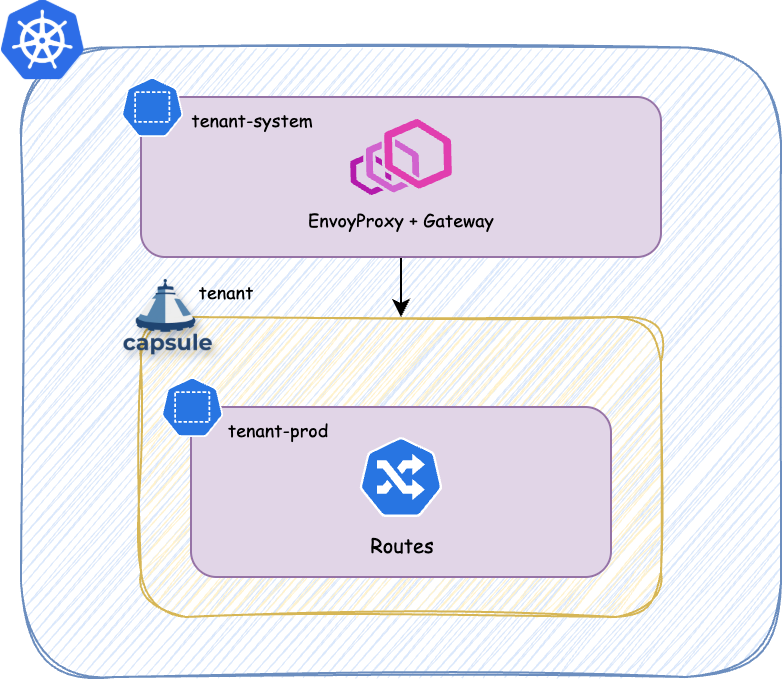
Each tenant will get it’s own -system Namespace. However that namespace is not managed by the Tenant nor part of it. It’s the namespace where the platform deploys managed services for each Tenant, which are out of bound for TenantOwners.
Example
Implementation of the above architecture looks something like this.
Managed Gateway
With this GlobalTenantResource we generate the managed gateway for each tenant. The EnvoyProxy is the custom resource used by the Envoy Gateway project to manage the lifecycle of the Envoy instances. The Gateway is the standard resource defined by the Gateway API, which references the EnvoyProxy as infrastructure and defines the listeners and allowed routes.
---
apiVersion: capsule.clastix.io/v1beta2
kind: GlobalTenantResource
metadata:
  name: managed-envoy-gateway
spec:
  scope: Tenant
  resyncPeriod: 30s
  resources:
    - context:
        resources:
          - apiVersion: gateway.networking.k8s.io/v1
            kind: HTTPRoute
            index: https
            selector:
              matchLabels:
                projectcapsule.dev/tenant: "{{tenant.name}}"
      generators:
        - missingKey: zero
          template: |
            {{- $ingressBandwidth := dig "spec" "data" "networking" "ingress" "bandwidth" "" $.tenant }}
            {{- $egressBandwidth := dig "spec" "data" "networking" "egress" "bandwidth" "" $.tenant }}
            {{- $loadBalancerIP := dig "spec" "data" "networking" "ingress" "loadbalancer" "" $.tenant }}
            ---
            apiVersion: gateway.envoyproxy.io/v1alpha1
            kind: EnvoyProxy
            metadata:
              name: tenant-{{ $.tenant.metadata.name }}-gateway
              namespace: tenant-{{ $.tenant.metadata.name }}-system
            spec:
              logging:
                level:
                  default: info
              provider:
                type: Kubernetes
                kubernetes:
                  envoyDeployment:
                    replicas: 2
                    pod:
                      priorityClassName: tenant-critical
                      {{- if or $ingressBandwidth $egressBandwidth }}
                      annotations:
                        {{- with $ingressBandwidth }}
                        kubernetes.io/ingress-bandwidth: {{ . }}
                        {{- end }}
                        {{- with $egressBandwidth }}
                        kubernetes.io/egress-bandwidth: {{ . }}
                        {{- end }}
                      {{- end }}
                  {{- with $loadBalancerIP }}
                  envoyService:
                    loadBalancerIP: {{ . }}
                  {{- end }}

        - missingKey: zero
          template: |
            ---
            apiVersion: gateway.networking.k8s.io/v1
            kind: Gateway
            metadata:
              name: tenant-{{ $.tenant.metadata.name }}-gateway
              namespace: tenant-{{ $.tenant.metadata.name }}-system
              annotations:
                cert-manager.io/cluster-issuer: managed-cluster-issuer
                cert-manager.io/private-key-size: "4096"
                cert-manager.io/private-key-algorithm: RSA
            spec:
              gatewayClassName: tenants
              infrastructure:
                parametersRef:
                  group: gateway.envoyproxy.io
                  kind: EnvoyProxy
                  name: tenant-{{ $.tenant.metadata.name }}-gateway
              listeners:
                - name: http-challenge
                  port: 80
                  protocol: HTTP
                  allowedRoutes:
                    namespaces:
                      from: Selector
                      selector:
                        matchLabels:
                          capsule.clastix.io/tenant: "{{ $.tenant.metadata.name }}"
                {{- range $_, $http := $.https }}
                  {{- range $i, $hostname := $http.spec.hostnames }}
                - name: {{ $http.metadata.namespace }}-{{ $http.metadata.name }}-{{ $i }}
                  port: 443
                  protocol: HTTPS
                  hostname: {{ $hostname}}
                  tls:
                    mode: Terminate
                    certificateRefs:
                      - group: ''
                        kind: Secret
                        name: {{ $http.metadata.namespace }}-{{ $http.metadata.name }}-{{ $i }}-tls
                  allowedRoutes:
                    namespaces:
                      from: Selector
                      selector:
                        matchLabels:
                           kubernetes.io/metadata.name: "{{ $http.metadata.namespace }}"
                  {{- end }}
                {{- end }}
Certificate Management
If we additionally would like to do Certificate Management via cert-manager in combination with ACME HTTP-01 challenges we probably want to provide the users with a ClusterIssuer per Tenant:
apiVersion: capsule.clastix.io/v1beta2
kind: GlobalTenantResource
metadata:
  name: tenant-acme-issuer
spec:
  scope: Tenant
  resources:
    - rawItems:
      - apiVersion: cert-manager.io/v1
        kind: Issuer
        metadata:
          name: {{tenant.name}}-acme-http
          namespace: {{tenant.name}}-system
        spec:
          acme:
            email: platform@email.com
            server: https://acme-staging-v02.api.letsencrypt.org/directory
            privateKeySecretRef:
              name: cert-letsencrypt-staging
            solvers:
              - http01:
                  gatewayHTTPRoute:
                    parentRefs:
                      - group: gateway.networking.k8s.io
                        kind: Gateway
                        name: {{tenant.name}}-gateway
                        namespace: {{tenant.name}}-system
                        sectionName: http-challenge
1.5 - External Secrets Operator
Integrate shared and per-Tenant secret stores, generate passwords, and distribute credentials with Capsule.
External Secrets Operator (ESO) fetches credentials from a secret backend or generates them, then writes Kubernetes Secrets. Capsule can provision the ESO resources and distribute the resulting Secrets across a Tenant’s namespaces.
This guide covers three patterns:
| Pattern | How it works |
|---|
Shared ClusterSecretStore | Approved Tenants read credentials intended to be shared, using one backend identity. |
Dedicated ClusterSecretStore per Tenant | Capsule generates a store restricted to that Tenant’s namespaces, with a separate backend identity. |
| Generated password per Tenant | ESO creates one source Secret, then Capsule replicates its value into every namespace of that Tenant. |
A namespaced SecretStore is usable in its own namespace. A ClusterSecretStore is cluster-scoped and can be referenced across namespaces, subject to its conditions. Neither resource contains the application credentials itself: an ExternalSecret references the store and describes the target Secret. See ESO’s multi-tenancy guide.
Prerequisites
Run the platform setup as a cluster administrator. You need:
- Capsule with GlobalTenantResource generators and
scope: Tenant support. - ESO installed with the
external-secrets.io/v1 APIs and the generators.external-secrets.io/v1alpha1 Password API. Its controllers must watch the platform and Tenant namespaces and process ClusterSecretStore resources. kubectl, and Python 3 for the password verification example.- For the store examples, a reachable Vault server with a KV v2 engine mounted at
secret, and permission to provision its policies and tokens. Replace https://vault.example.com with your endpoint and configure a trusted CA if needed.
The store examples use Vault to demonstrate backend permissions. The same namespace restrictions apply to other ESO providers, including Azure Key Vault. The password-generation example does not require an external backend or a store.
Example Tenants and namespaces
Save this as tenants.yaml and apply it as a cluster administrator. If these Tenants already exist, add the example label to their current manifests while preserving their owners and other configuration.
apiVersion: capsule.clastix.io/v1beta2
kind: Tenant
metadata:
  name: solar
  labels:
    secrets.example.com/enabled: "true"
spec:
  owners:
    - kind: Group
      name: solar-engineers
---
apiVersion: capsule.clastix.io/v1beta2
kind: Tenant
metadata:
  name: wind
  labels:
    secrets.example.com/enabled: "true"
spec:
  owners:
    - kind: Group
      name: wind-engineers
---
apiVersion: v1
kind: Namespace
metadata:
  name: solar-dev
  labels:
    capsule.clastix.io/tenant: solar
---
apiVersion: v1
kind: Namespace
metadata:
  name: solar-prod
  labels:
    capsule.clastix.io/tenant: solar
---
apiVersion: v1
kind: Namespace
metadata:
  name: wind-dev
  labels:
    capsule.clastix.io/tenant: wind
kubectl apply -f tenants.yaml
kubectl get namespaces -L capsule.clastix.io/tenant
The secrets.example.com/enabled label selects Tenants for the GlobalTenantResources below. The capsule.clastix.io/tenant namespace label identifies their ownership and is protected by Capsule. Tenant owners normally create namespaces through Capsule’s namespace workflow.
Keep backend authentication credentials and generated source Secrets in a platform-owned namespace, outside any Tenant. Tenant owners must not have access to this namespace or permission to modify cluster-scoped stores and GlobalTenantResources.
Save this as eso-provisioner.yaml:
apiVersion: v1
kind: Namespace
metadata:
  name: capsule-secrets-system
---
apiVersion: v1
kind: ServiceAccount
metadata:
  name: capsule-eso
  namespace: capsule-secrets-system
---
apiVersion: rbac.authorization.k8s.io/v1
kind: Role
metadata:
  name: capsule-eso-generators
  namespace: capsule-secrets-system
rules:
  - apiGroups: ["external-secrets.io"]
    resources: ["externalsecrets"]
    verbs: ["get", "list", "create", "patch", "delete"]
  - apiGroups: ["generators.external-secrets.io"]
    resources: ["passwords"]
    verbs: ["get", "list", "create", "patch", "delete"]
---
apiVersion: rbac.authorization.k8s.io/v1
kind: RoleBinding
metadata:
  name: capsule-eso-generators
  namespace: capsule-secrets-system
roleRef:
  apiGroup: rbac.authorization.k8s.io
  kind: Role
  name: capsule-eso-generators
subjects:
  - kind: ServiceAccount
    name: capsule-eso
    namespace: capsule-secrets-system
---
apiVersion: rbac.authorization.k8s.io/v1
kind: ClusterRole
metadata:
  name: capsule-eso-replication
rules:
  - apiGroups: ["external-secrets.io"]
    resources: ["clustersecretstores"]
    verbs: ["get", "list", "create", "patch", "delete"]
  - apiGroups: [""]
    resources: ["secrets"]
    verbs: ["get", "list", "create", "patch", "delete"]
---
apiVersion: rbac.authorization.k8s.io/v1
kind: ClusterRoleBinding
metadata:
  name: capsule-eso-replication
roleRef:
  apiGroup: rbac.authorization.k8s.io
  kind: ClusterRole
  name: capsule-eso-replication
subjects:
  - kind: ServiceAccount
    name: capsule-eso
    namespace: capsule-secrets-system
kubectl apply -f eso-provisioner.yaml
The GlobalTenantResources use this ServiceAccount through Capsule impersonation. The ClusterRole permits Secret replication into current and future Tenant namespaces, which requires broad Secret access; reserve this identity for the platform. ESO uses its own permissions to read authentication credentials, invoke generators, and write source Secrets.
Secure ClusterSecretStores
A store needs two independent access boundaries:
- Kubernetes namespace access:
spec.conditions determines which namespaces may reference the store. - Backend access: the store’s Vault policy, cloud IAM role, or equivalent determines which remote secrets it may fetch.
All users of a store share its backend permissions. A name such as tenant-solar-vault, or a tenant-specific remoteRef.key in an example, does not restrict users to that path. Someone able to create an ExternalSecret can request a different key within the backend identity’s permissions.
For an existing platform-only store, keep its provider configuration and restrict its conditions to the platform namespace:
spec:
  conditions:
    - namespaces:
        - capsule-secrets-system
Alternatively, a namespace selector using matchExpressions with key capsule.clastix.io/tenant and operator DoesNotExist can admit all namespaces outside Capsule Tenants. An explicit namespace allowlist is narrower. With no conditions, a ClusterSecretStore is usable from all namespaces. Conditions are alternatives: matching any entry grants access, so remove broader entries when restricting an existing store. See ClusterSecretStore conditions.
Use a shared ClusterSecretStore
Use a shared store for credentials that all participating Tenants are allowed to read, such as access to a common package registry. This example admits namespaces belonging to solar and wind.
Provision a Vault identity with a policy allowing only the shared KV v2 path. For example, save this as eso-shared.hcl:
path "secret/data/shared/*" {
  capabilities = ["read"]
}
The policy uses the Vault KV v2 read path, which includes the data segment. An ESO remoteRef.key below is relative to the secret mount and omits data.
Using an authenticated Vault CLI and jq, create the policy and store its token directly in Kubernetes:
set -o pipefail
vault policy write eso-shared eso-shared.hcl
vault token create -policy=eso-shared -format=json \
  | jq -j '.auth.client_token' \
  | kubectl -n capsule-secrets-system create secret generic vault-shared \
      --from-file=token=/dev/stdin
Manage the token’s expiration, renewal, and rotation as part of your backend setup. ESO also supports Vault Kubernetes authentication when you want to use dedicated ServiceAccount identities instead.
Save this as shared-store.yaml:
apiVersion: external-secrets.io/v1
kind: ClusterSecretStore
metadata:
  name: shared-vault
spec:
  conditions:
    - namespaceSelector:
        matchExpressions:
          - key: capsule.clastix.io/tenant
            operator: In
            values: ["solar", "wind"]
  provider:
    vault:
      server: https://vault.example.com
      path: secret
      version: v2
      auth:
        tokenSecretRef:
          name: vault-shared
          namespace: capsule-secrets-system
          key: token
kubectl apply -f shared-store.yaml
kubectl wait --for=condition=Ready --timeout=120s clustersecretstore/shared-vault
Create a Vault record at secret/shared/registry with a password property using your normal secret-management workflow. A user in an admitted namespace can then apply shared-credential.yaml:
apiVersion: external-secrets.io/v1
kind: ExternalSecret
metadata:
  name: shared-registry
  namespace: solar-dev
spec:
  refreshPolicy: Periodic
  refreshInterval: 1h
  secretStoreRef:
    kind: ClusterSecretStore
    name: shared-vault
  target:
    name: shared-registry
    creationPolicy: Owner
  data:
    - secretKey: password
      remoteRef:
        key: shared/registry
        property: password
kubectl apply -f shared-credential.yaml
kubectl -n solar-dev wait --for=condition=Ready --timeout=120s externalsecret/shared-registry
ESO creates the shared-registry Secret in solar-dev. Apply the same ExternalSecret in another admitted namespace to fetch that shared credential there as well. A namespace outside solar and wind cannot use this store, even if its users know the store name.
Create a dedicated ClusterSecretStore per Tenant
For tenant-specific credentials, give each store a different backend identity. This example generates tenant-solar-vault and tenant-wind-vault, with names derived from the Capsule Tenant name.
First provision a separate Vault policy and token for each Tenant. Solar’s eso-tenant-solar.hcl policy is:
path "secret/data/tenants/solar/*" {
  capabilities = ["read"]
}
set -o pipefail
vault policy write eso-tenant-solar eso-tenant-solar.hcl
vault token create -policy=eso-tenant-solar -format=json \
  | jq -j '.auth.client_token' \
  | kubectl -n capsule-secrets-system create secret generic vault-tenant-solar \
      --from-file=token=/dev/stdin
Repeat for Wind, using secret/data/tenants/wind/*, policy eso-tenant-wind, and Secret vault-tenant-wind. Do not reuse a token that can read both tenants’ paths. These Kubernetes authentication Secrets hold a token key and remain in the platform namespace. Capsule generates the stores; it does not create Vault policies or tokens.
Save this as tenant-stores.yaml:
apiVersion: capsule.clastix.io/v1beta2
kind: GlobalTenantResource
metadata:
  name: tenant-secret-stores
spec:
  scope: Tenant
  resyncPeriod: 60s
  serviceAccount:
    name: capsule-eso
    namespace: capsule-secrets-system
  tenantSelector:
    matchLabels:
      secrets.example.com/enabled: "true"
  resources:
    - generators:
        - missingKey: error
          template: |
            apiVersion: external-secrets.io/v1
            kind: ClusterSecretStore
            metadata:
              name: tenant-{{ $.tenant.metadata.name }}-vault
            spec:
              conditions:
                - namespaceSelector:
                    matchLabels:
                      capsule.clastix.io/tenant: {{ $.tenant.metadata.name | quote }}
              provider:
                vault:
                  server: https://vault.example.com
                  path: secret
                  version: v2
                  auth:
                    tokenSecretRef:
                      name: vault-tenant-{{ $.tenant.metadata.name }}
                      namespace: capsule-secrets-system
                      key: token
kubectl apply -f tenant-stores.yaml
kubectl wait --for=condition=Ready --timeout=120s globaltenantresource/tenant-secret-stores
kubectl wait --for=condition=Ready --timeout=120s \
  clustersecretstore/tenant-solar-vault clustersecretstore/tenant-wind-vault
scope: Tenant creates one cluster-scoped store per Tenant. The store itself has no metadata.namespace; its authentication Secret reference must include one. Its namespace selector automatically admits new namespaces owned by that Tenant.
After creating secret/tenants/solar/application in Vault with a password property, apply tenant-credential.yaml:
apiVersion: external-secrets.io/v1
kind: ExternalSecret
metadata:
  name: application-credentials
  namespace: solar-dev
spec:
  refreshPolicy: Periodic
  refreshInterval: 1h
  secretStoreRef:
    kind: ClusterSecretStore
    name: tenant-solar-vault
  target:
    name: application-credentials
    creationPolicy: Owner
  data:
    - secretKey: password
      remoteRef:
        key: tenants/solar/application
        property: password
kubectl apply -f tenant-credential.yaml
kubectl -n solar-dev wait --for=condition=Ready --timeout=120s \
  externalsecret/application-credentials
Check both boundaries when validating this setup: an ExternalSecret in wind-dev referencing tenant-solar-vault should be denied by the store’s namespace conditions. An ExternalSecret in solar-dev using its own store but requesting tenants/wind/application should be denied by Vault. Use a separate test resource and target Secret when checking denied requests, and inspect its conditions with kubectl describe externalsecret.
Generate one password and distribute it to every Tenant namespace
An ESO Password generator produces a new random value each time it is invoked. Referencing the same generator from several ExternalSecrets produces different passwords. To share one credential throughout a Tenant, generate it in one source Secret and replicate that Secret. The generator resource holds the password-generation settings, not the generated password. See generator behavior.
flowchart LR
  GTR[GlobalTenantResource: scope Tenant] --> Password[Password generator]
  GTR --> ES[One ExternalSecret per Tenant]
  Password --> ES
  ES --> Source[Source Secret in capsule-secrets-system]
  Source --> Replication[GlobalTenantResource: scope Namespace]
  Replication --> Dev[Same Secret in solar-dev]
  Replication --> Prod[Same Secret in solar-prod]
Generate the source Secrets
Save this as tenant-password-sources.yaml. It creates a Password generator and an ExternalSecret for each enabled Tenant, all in capsule-secrets-system:
apiVersion: capsule.clastix.io/v1beta2
kind: GlobalTenantResource
metadata:
  name: tenant-password-sources
spec:
  scope: Tenant
  resyncPeriod: 60s
  serviceAccount:
    name: capsule-eso
    namespace: capsule-secrets-system
  tenantSelector:
    matchLabels:
      secrets.example.com/enabled: "true"
  resources:
    - generators:
        - missingKey: error
          template: |
            apiVersion: generators.external-secrets.io/v1alpha1
            kind: Password
            metadata:
              name: tenant-{{ $.tenant.metadata.name }}-password
              namespace: capsule-secrets-system
            spec:
              length: 32
              digits: 6
              symbols: 0
              noUpper: false
              allowRepeat: true
            ---
            apiVersion: external-secrets.io/v1
            kind: ExternalSecret
            metadata:
              name: tenant-{{ $.tenant.metadata.name }}-password
              namespace: capsule-secrets-system
            spec:
              refreshPolicy: CreatedOnce
              target:
                name: tenant-{{ $.tenant.metadata.name }}-password
                creationPolicy: Owner
                template:
                  engineVersion: v2
                  mergePolicy: Merge
                  type: Opaque
                  metadata:
                    labels:
                      secrets.example.com/tenant: {{ $.tenant.metadata.name | quote }}
                      secrets.example.com/purpose: shared-password
              dataFrom:
                - sourceRef:
                    generatorRef:
                      apiVersion: generators.external-secrets.io/v1alpha1
                      kind: Password
                      name: tenant-{{ $.tenant.metadata.name }}-password
kubectl apply -f tenant-password-sources.yaml
kubectl wait --for=condition=Ready --timeout=120s globaltenantresource/tenant-password-sources
kubectl -n capsule-secrets-system wait --for=condition=Ready --timeout=120s \
  externalsecret/tenant-solar-password externalsecret/tenant-wind-password
For Solar, ESO creates capsule-secrets-system/tenant-solar-password with a password data key. Wind gets an independent value in tenant-wind-password. A generator reference resolves in the ExternalSecret’s namespace and does not need secretStoreRef.
CreatedOnce avoids scheduled regeneration. Capsule’s resyncPeriod reconciles the ESO resource definitions; it does not request a new password on every pass. However, ESO can sync again if the target Secret changes or is deleted, or if the ExternalSecret is recreated. Treat source recreation as credential rotation and retain a backup if the credential must survive recovery.
The explicit target.template.metadata is significant: it defines the source Secret’s labels instead of inheriting the Capsule management labels from its ExternalSecret. Capsule skips Secrets marked projectcapsule.dev/created-by: resources during replication to prevent loops. Keep the source Secret owned by ESO and its replicas owned by Capsule; do not stamp Capsule’s reserved labels onto the source. ESO’s template metadata behavior controls this distinction.
Replicate the source into all namespaces
Save this as tenant-password-replication.yaml:
apiVersion: capsule.clastix.io/v1beta2
kind: GlobalTenantResource
metadata:
  name: tenant-password-replication
spec:
  scope: Namespace
  resyncPeriod: 60s
  serviceAccount:
    name: capsule-eso
    namespace: capsule-secrets-system
  tenantSelector:
    matchLabels:
      secrets.example.com/enabled: "true"
  resources:
    - namespacedItems:
        - apiVersion: v1
          kind: Secret
          namespace: capsule-secrets-system
          name: "tenant-{{tenant.name}}-password"
          optional: false
kubectl apply -f tenant-password-replication.yaml
kubectl wait --for=condition=Ready --timeout=120s globaltenantresource/tenant-password-replication
The namespaced reference selects one source by name for each Tenant. With scope: Namespace and no namespaceSelector, Capsule copies it into every namespace of that Tenant, preserving its name and data. New namespaces receive the existing value on reconciliation. optional: false reports a missing source instead of silently producing no copies.
Capsule’s generator and replication readiness only covers Kubernetes resources. It does not prove that ESO has created the source Secret, which is why the commands wait for the source ExternalSecrets separately. If the two GlobalTenantResources are applied together, replication may initially report a missing Secret and then succeed once ESO creates it.
Verify identical values and tenant isolation
Check that both Solar namespaces have Solar’s Secret and Wind has only its own:
kubectl -n solar-dev get secret tenant-solar-password
kubectl -n solar-prod get secret tenant-solar-password
kubectl -n wind-dev get secret tenant-wind-password
kubectl -n wind-dev get secret tenant-solar-password
The last command should report NotFound. This Python check compares the values without printing passwords or hashes:
import base64
import json
import subprocess


def password(namespace, name):
    raw = subprocess.check_output(
        ["kubectl", "-n", namespace, "get", "secret", name, "-o", "json"]
    )
    return base64.b64decode(json.loads(raw)["data"]["password"])


solar = password("capsule-secrets-system", "tenant-solar-password")
wind = password("capsule-secrets-system", "tenant-wind-password")
assert len(solar) == 32
assert solar == password("solar-dev", "tenant-solar-password")
assert solar == password("solar-prod", "tenant-solar-password")
assert wind == password("wind-dev", "tenant-wind-password")
assert solar != wind
print("Passwords match within each Tenant and differ between Tenants.")
Create another namespace belonging to Solar and repeat the comparison after replication. The new namespace should receive the same source value; adding a namespace does not invoke the Password generator again.
Workloads consume the local copy through a Secret volume or secretKeyRef. For example, use this fragment in a Pod template in solar-dev or solar-prod:
env:
  - name: APPLICATION_PASSWORD
    valueFrom:
      secretKeyRef:
        name: tenant-solar-password
        key: password
Register the generated credential with the service that authenticates it. Creating or copying a Secret does not set a database user’s password or otherwise configure that service.
Rotation and lifecycle
For backend-managed values, update the backend record. The Periodic ExternalSecrets fetch it on their next refresh. Backend authentication tokens have their own lifecycle and must be renewed or replaced separately.
For generated passwords, CreatedOnce keeps the source stable during ordinary reconciliation. Recreating the source can produce a different password, and Capsule will then distribute the new value. Coordinate rotation with the authenticating service and all consuming workloads. Applications using environment variables need a restart to load changed Secret values; applications reading Secret volumes need to reload them.
The example uses creationPolicy: Owner, so deleting the source ExternalSecret also makes its source Secret eligible for garbage collection. Removing the Tenant’s opt-in label or deleting its GlobalTenantResources can prune generated objects and replicas under Capsule’s object management rules. Check that replicas are removed and service credentials are revoked during offboarding. Source removal alone is not immediate credential revocation.
For credentials that must survive deleting and recreating an ExternalSecret, ESO documents creationPolicy: Orphan with an immutable target. That changes cleanup and rotation: retained source Secrets need explicit offboarding, and immutable replicas cannot be updated in place. Choose that lifecycle deliberately rather than adding immutability to the replication example unchanged.
1.6 - Headlamp
Capsule Integration with Headlamp
Headlamp is an easy-to-use and extensible Kubernetes web UI.
Headlamp was created to blend the traditional feature set of other web UIs/dashboards (i.e., to list and view resources) with added functionality.
Prerequisites
- You will need a running Capsule Proxy instance.
- For Authentication you will need a Confidential OIDC client configured in your OIDC provider, such as Keycloak, Dex, or Google Cloud Identity. By default the Kubernetes API only validates tokens against a Public OIDC client, so you will need to configure your OIDC provider to allow the Headlamp client to issue tokens. You must make use of the Kubernetes Authentication Configuration, which allows to define multiple audiences (clients). This way we can issue tokens for a headlamp client, which is Confidential (Client Secret), and a kubernetes client, which is Public. The Kubernetes API will validate the tokens against both clients. The Config might look like this:
apiVersion: apiserver.config.k8s.io/v1beta1
kind: AuthenticationConfiguration
jwt:
- issuer:
    url: https://keycloak/realms/realm-name
    audiences:
    - kubernetes
    - headlamp
    audienceMatchPolicy: MatchAny # This one is important
  claimMappings:
    username:
      claim: 'email'
      prefix: ""
    groups:
      claim: 'groups'
      prefix: ""
Read More
Integration
To install Headlamp, you can use the Helm chart provided in the Headlamp repository. It’s a bit special how Headlamp handles Certificate Authorities. We need to inject the capsule-proxy CA into the trust store for Headlamp. In the below example we are using the CA Bundle from alpine (because we also need to trust the CA of the OIDC Issuer, in this case it uses Let’s Encrypt). See the issues #3707 and #127. Essentially Golang uses some environment variables to allow specifying cert files/dirs overriding the system defaults. By Default this is under /etc/ssl/. You can change this behavior by defining the environment variables SSL_CERT_FILE or/and SSL_CERT_DIR.
It’s recommended to install headlamp in the capsule-system namespace. Otherwise you need to somehow replicate the internal ca secret to the namespace, where headlamp is deployed to. For this case Cert-Manager Trust-Bundles might be useful.
With the following values we got it to work:
config:
  inCluster: true
  extraArgs:
  - -insecure-ssl
env:
  - name: KUBERNETES_SERVICE_HOST
    value: "capsule-proxy.capsule-system.svc"
  - name: KUBERNETES_SERVICE_PORT
    value: "9001"
  - name: "OIDC_ISSUER_URL"
    value: "https://keycloak/realms/realm-name"
  - name: "OIDC_CLIENT_ID"
    value: "headlamp"
  - name: "OIDC_CLIENT_SECRET"
    value: "<SECRET>"
  - name: "OIDC_USE_ACCESS_TOKEN"
    value: "false"
  #- name: "OIDC_SCOPES"
  #  value: "openid profile email groups offline_access"
volumeMounts:
  - mountPath: /var/run/secrets/kubernetes.io/serviceaccount
    name: token-ca
  - name: ca-store
    mountPath: /etc/ssl/
volumes:
  - name: ca-store
    emptyDir: {}
  - name: capsule-proxy
    secret:
      secretName: capsule-proxy
  - name: token-ca
    projected:
      sources:
        - serviceAccountToken:
            path: token
        - secret:
            items:
              - key: ca.crt
                path: ca.crt
            name: capsule-proxy
        - downwardAPI:
            items:
              - fieldRef:
                  apiVersion: v1
                  fieldPath: metadata.namespace
                path: namespace
initContainers:
- name: add-ca
  image: alpine:3
  command: ["/bin/sh","-c"]
  args:
  - |
    set -e
    cp -R /etc/ssl/* /work/
    cat /ca/ca.crt >> /work/certs/ca-certificates.crt
  volumeMounts:
  - name: ca-store
    mountPath: /work
  - name: capsule-proxy
    mountPath: /ca
  securityContext:
    runAsNonRoot: true
    capabilities:
      drop:
      - ALL
    readOnlyRootFilesystem: false
    allowPrivilegeEscalation: false
    privileged: false
    runAsUser: 65534
    runAsGroup: 65534
podSecurityContext:
  runAsNonRoot: true
  seccompProfile:
    type: RuntimeDefault
securityContext:
  capabilities:
    drop:
    - ALL
  readOnlyRootFilesystem: false
  allowPrivilegeEscalation: false
  privileged: false
  runAsUser: 100
  runAsGroup: 101
  fsGroup: 101
  fsGroupChangePolicy: "Always"
Note: The secret capsule-proxy refers to the secret which is being used by the capsule-proxy instance directly, not the self-signed-ca secret.
Plugins
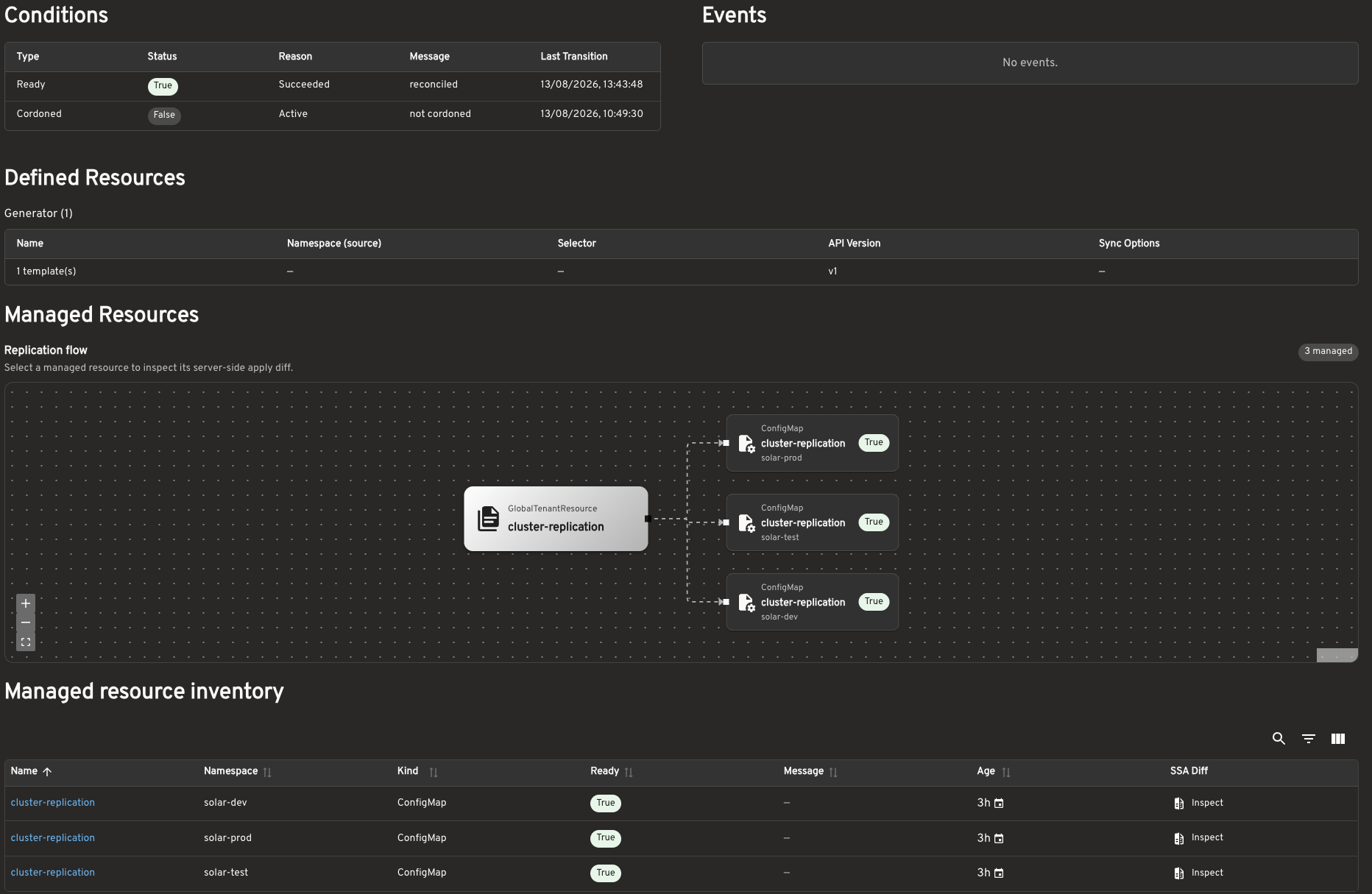
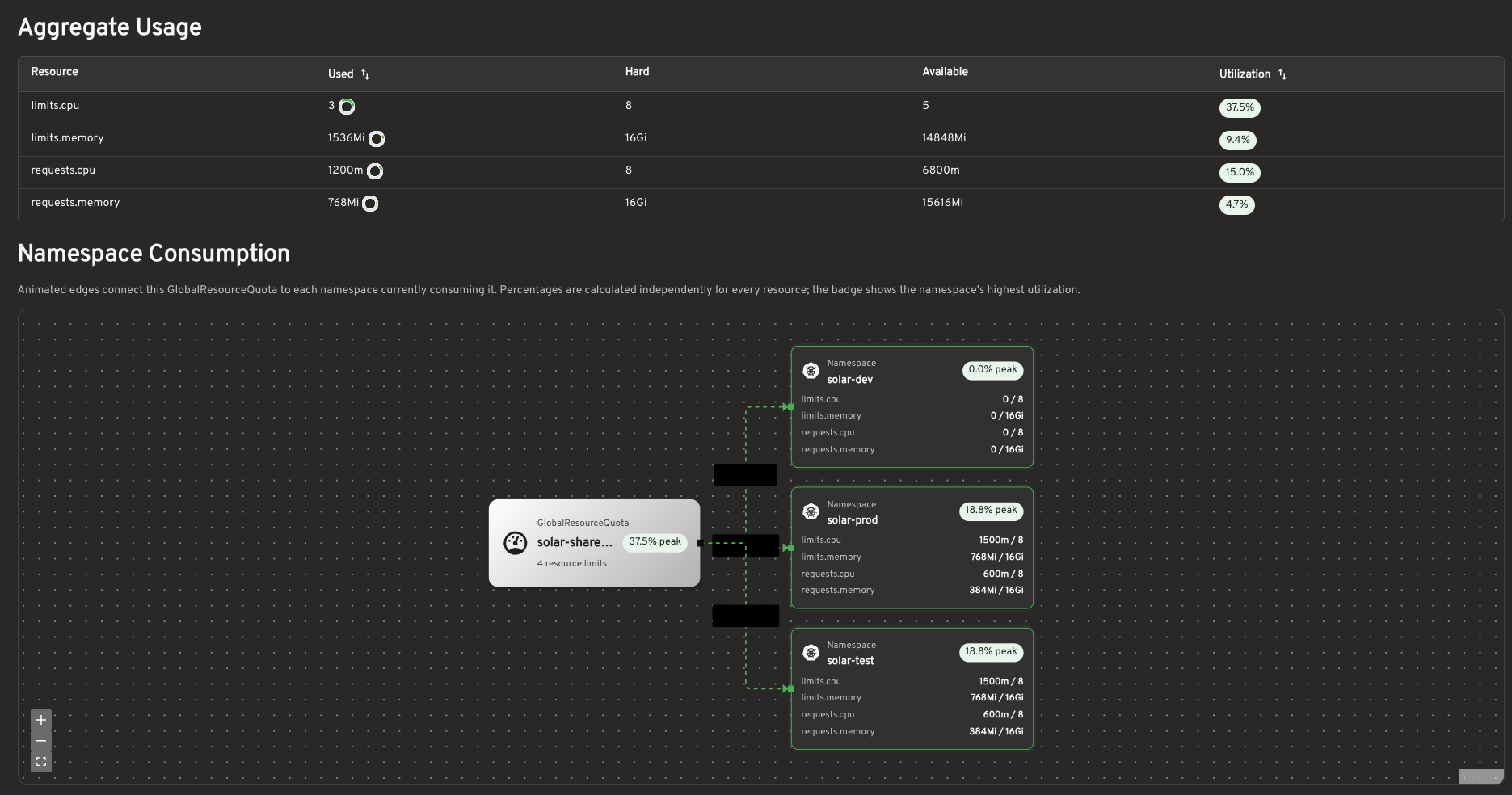
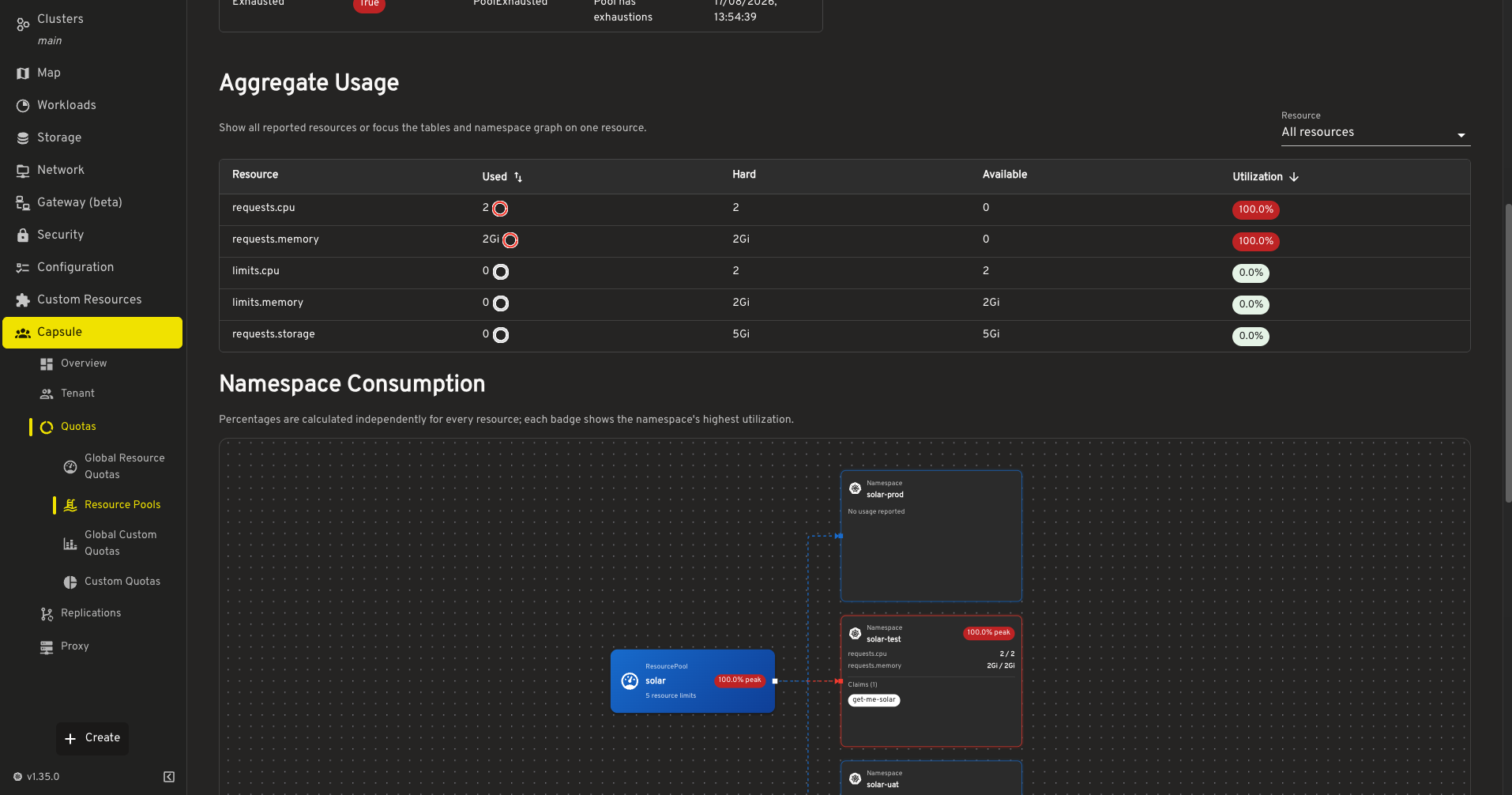
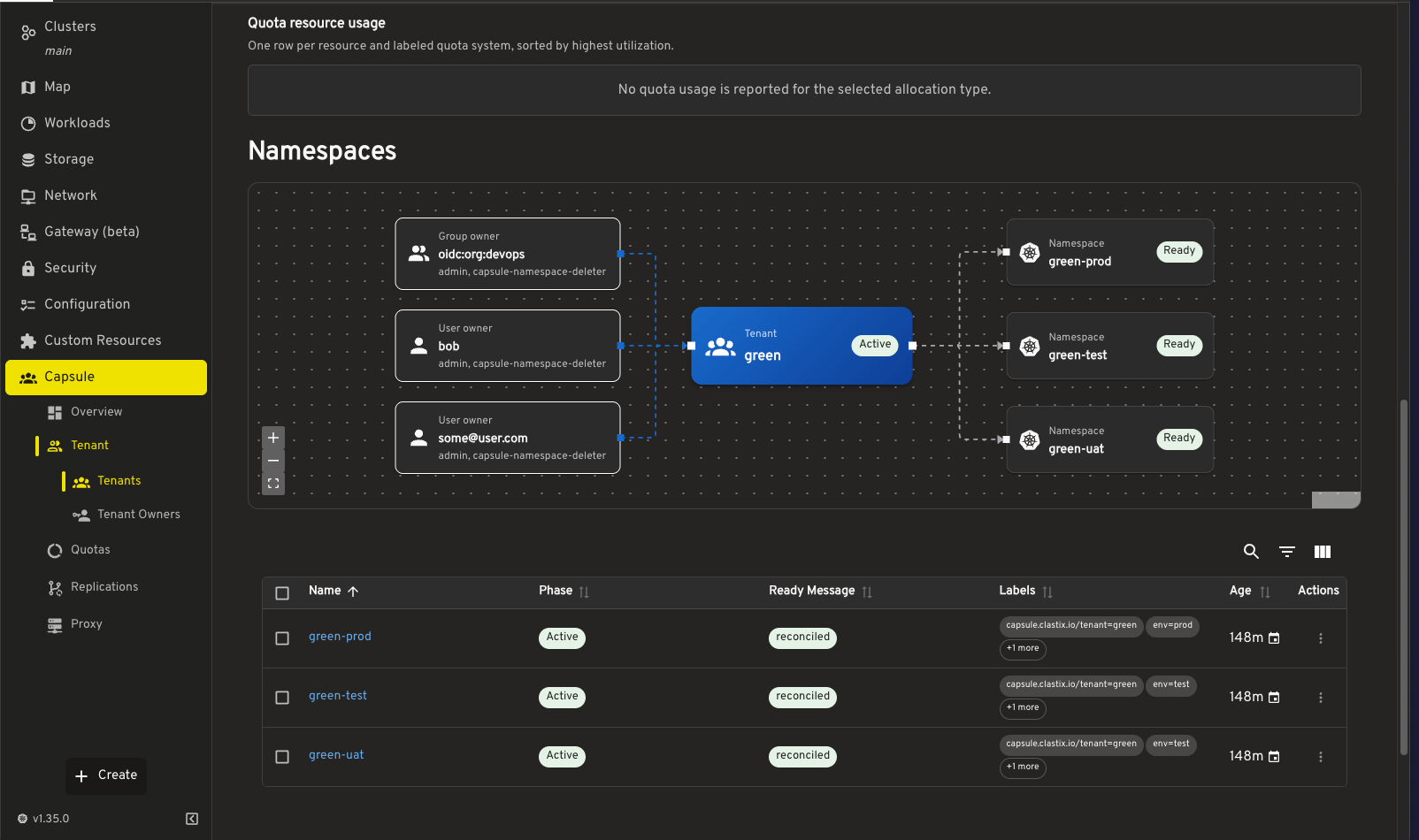
We provide a plugin for Headlamp to enhance the user experience when using Capsule. The plugin is available in the Headlamp Plugin Repository.
Offers great UX for both Capsule Admins and Tenant Owners. The plugin provides a dedicated view for Capsule Tenants, allowing users to easily manage their resources and view their usage. It also provides a dedicated view for Capsule Admins, allowing them to easily manage Tenants and view their usage.
1.7 - Kyverno
Capsule integration with Kyverno
Kyverno is a policy engine designed for Kubernetes. It provides the ability to validate, mutate, and generate Kubernetes resources using admission control. Kyverno policies are managed as Kubernetes resources and can be applied to a cluster using kubectl. Capsule integrates with Kyverno to provide a set of policies that can be used to improve the security and governance of the Kubernetes cluster.
Permissions
Some policies are attempting to query Capsule specific information, such as the tenant name based on the namespace. Therefore, we need to ensure that Kyverno has the necessary permissions to read Capsule resources. This can be achieved by extending the Kyverno ClusterRole to include Capsule resources:
admissionController:
  rbac:
    clusterRole:
      extraResources:
       - apiGroups: ["capsule.clastix.io"]
         resources: ["*"]
         verbs: ["get", "list"]
Recommended Policies
Not all relevant settings are covered by Capsule. We recommend to use Kyverno to enforce additional policies, as their policy implementation is of a very high standard. Here are some policies you might want to consider in multi-tenant environments:
Moved to new page
References
Here are some policies for reference. We do not provide a complete list of policies, but we provide some examples to get you started. This policies are not meant to be used in production. You may adopt principles shown here to create your own policies.
To get the tenant name based on the namespace, you can use a context. With this context we resolve the tenant, based on the {{request.namespace}} for the requested resource. The context calls /api/v1/namespaces/ API with the {{request.namespace}}. The jmesPath is used to check if the tenant label is present. You could assign a default if nothing was found, in this case it’s empty string:
    context:
      - name: tenant_name
        apiCall:
          method: GET
          urlPath: "/api/v1/namespaces/{{request.namespace}}"
          jmesPath: "not_null(metadata.labels.\"capsule.clastix.io/tenant\" || '')"
Select namespaces with label capsule.clastix.io/tenant
When you are performing a policy on namespaced objects, you can select the objects, which are within a tenant namespace by using the namespaceSelector. In this example we select all Kustomization and HelmRelease resources which are within a tenant namespace:
apiVersion: kyverno.io/v1
kind: ClusterPolicy
metadata:
  name: flux-policies
spec:
  validationFailureAction: Enforce
  rules:
    # Enforcement (Mutate to Default)
    - name: Defaults Kustomizations/HelmReleases
      match:
        any:
        - resources:
            kinds:
              - Kustomization
              - HelmRelease
            operations:
              - CREATE
              - UPDATE
            namespaceSelector:
              matchExpressions:
                - key: "capsule.clastix.io/tenant"
                  operator: Exists
      mutate:
        patchStrategicMerge:
          spec:
            +(targetNamespace): "{{ request.object.metadata.namespace }}"
            +(serviceAccountName): "default"
Compare Source and Destination Tenant
With this policy we try to enforce, that helmreleases within a tenant can only use targetNamespaces, which are within the same tenant or the same namespace the resource is deployed in:
apiVersion: kyverno.io/v1
kind: ClusterPolicy
metadata:
  name: tenant-compare
spec:
  validationFailureAction: Enforce
  background: true
  rules:
    - name: Validate HelmRelease/Kustomization Target Namespace
      context:

        # Get tenant based on target namespace
        - name: destination_tenant
          apiCall:
            urlPath: "/api/v1/namespaces/{{request.object.spec.targetNamespace}}"
            jmesPath: "metadata.labels.\"capsule.clastix.io/tenant\""

        # Get tenant based on resource namespace
        - name: source_tenant
          apiCall:
            urlPath: "/api/v1/namespaces/{{request.object.metadata.namespace}}"
            jmesPath: "metadata.labels.\"capsule.clastix.io/tenant\""
      match:
        any:
        - resources:
            kinds:
              - HelmRelease
              - Kustomization
            operations:
              - CREATE
              - UPDATE
            namespaceSelector:
              matchExpressions:
                - key: "capsule.clastix.io/tenant"
                  operator: Exists
      preconditions:
        all:
          - key: "{{request.object.spec.targetNamespace}}"
            operator: NotIn
            values: [ "{{request.object.metadata.namespace}}" ]
      validate:
        message: "spec.targetNamespace must be in the same tenant ({{source_tenant}})"
        deny:
          conditions:
            - key: "{{source_tenant}}"
              operator: NotEquals
              value:  "{{destination_tenant}}"
Using Global Configuration
When creating a lot of policies, you might want to abstract your configuration into a global configuration. This is a good practice to avoid duplication and to have a single source of truth. Also if we introduce breaking changes (like changing the label name), we only have to change it in one place. Here is an example of a global configuration:
apiVersion: v1
kind: ConfigMap
metadata:
  name: kyverno-global-config
  namespace: kyverno-system
data:
  # Label for public namespaces
  public_identifier_label: "company.com/public"
  # Value for Label for public namespaces
  public_identifier_value: "yeet"
  # Label which is used to select the tenant name
  tenant_identifier_label: "capsule.clastix.io/tenant"
This configuration can be referenced via context in your policies. Let’s extend the above policy with the global configuration. Additionally we would like to allow the usage of public namespaces:
apiVersion: kyverno.io/v1
kind: ClusterPolicy
metadata:
  name: tenant-compare
spec:
  validationFailureAction: Enforce
  background: true
  rules:
    - name: Validate HelmRelease/Kustomization Target Namespace
      context:

        # Load Global Configuration
        - name: global
          configMap:
            name: kyverno-global-config
            namespace: kyverno-system

        # Get All Public Namespaces based on the label and it's value from the global configuration
        - name: public_namespaces
          apiCall:
            urlPath: "/api/v1/namespaces"
            jmesPath: "items[?metadata.labels.\"{{global.data.public_identifier_label}}\" == '{{global.data.public_identifier_value}}'].metadata.name | []"

        # Get Tenant information from source namespace
        # Defaults to a character, which can't be a label value
        - name: source_tenant
          apiCall:
            urlPath: "/api/v1/namespaces/{{request.object.metadata.namespace}}"
            jmesPath: "metadata.labels.\"{{global.data.tenant_identifier_label}}\" | '?'"

        # Get Tenant information from destination namespace
        # Returns Array with Tenant Name or Empty
        - name: destination_tenant
          apiCall:
            urlPath: "/api/v1/namespaces"
            jmesPath: "items[?metadata.name == '{{request.object.spec.targetNamespace}}'].metadata.labels.\"{{global.data.tenant_identifier_label}}\""

      preconditions:
        all:
          - key: "{{request.object.spec.targetNamespace}}"
            operator: NotIn
            values: [ "{{request.object.metadata.namespace}}" ]
        any:
          # Source is not Self-Reference
          - key: "{{request.object.spec.targetNamespace}}"
            operator: NotEquals
            value: "{{request.object.metadata.namespace}}"

          # Source not in Public Namespaces
          - key: "{{request.object.spec.targetNamespace}}"
            operator: NotIn
            value: "{{public_namespaces}}"

          # Source not in Destination
          - key: "{{request.object.spec.targetNamespace}}"
            operator: NotIn
            value: "{{destination_tenant}}"
      match:
        any:
        - resources:
            kinds:
              - HelmRelease
              - Kustomization
            operations:
              - CREATE
              - UPDATE
            namespaceSelector:
              matchExpressions:
                - key: "capsule.clastix.io/tenant"
                  operator: Exists
      validate:
        message: "Can not use namespace {{request.object.spec.chart.spec.sourceRef.namespace}} as source reference!"
        deny: {}
Extended Validation and Defaulting
Here’s extended examples for using validation and defaulting. The first policy is used to validate the tenant name. The second policy is used to default the tenant properties, you as cluster-administrator would like to enforce for each tenant.
apiVersion: kyverno.io/v1
kind: ClusterPolicy
metadata:
  name: tenant-core
spec:
  validationFailureAction: Enforce
  rules:
  - name: tenant-name
    match:
      all:
      - resources:
          kinds:
          - "capsule.clastix.io/v1beta2/Tenant"
          operations:
          - CREATE
          - UPDATE
    validate:
      message: "Using this tenant name is not allowed."
      deny:
        conditions:
          - key: "{{ request.object.metadata.name }}"
            operator: In
            value: ["default", "cluster-system" ]

  - name: tenant-properties
    match:
      any:
      - resources:
          kinds:
          - "capsule.clastix.io/v1beta2/Tenant"
          operations:
          - CREATE
          - UPDATE
    mutate:
      patchesJson6902: |-
        - op: add
          path: "/spec/namespaceOptions/forbiddenLabels/deniedRegex"
          value: ".*company.ch"
        - op: add
          path: "/spec/priorityClasses/matchLabels"
          value:
            consumer: "customer"
        - op: add
          path: "/spec/serviceOptions/allowedServices/nodePort"
          value: false
        - op: add
          path: "/spec/ingressOptions/allowedClasses/matchLabels"
          value:
            consumer: "customer"
        - op: add
          path: "/spec/storageClasses/matchLabels"
          value:
            consumer: "customer"
        - op: add
          path: "/spec/nodeSelector"
          value:
            nodepool: "workers"
Adding Default Owners/Permissions to Tenant
Since the Owners Spec is a list, it’s a bit more trickier to add a default owner without causing recursions. You must make sure, to validate if the value you are setting is already present. Otherwise you will create a loop. Here is an example of a policy, which adds the cluster:admin as owner to a tenant:
apiVersion: kyverno.io/v1
kind: ClusterPolicy
metadata:
  name: tenant-policy
spec:
  validationFailureAction: Enforce
  background: true
  rules:

  # With this policy for each tenant cluster:admin is added as owner.
  # Only Append these on CREATE, otherwise they will be added per reconciliation and create a loop.
  - name: tenant-owner
    preconditions:
      all:
      - key: "cluster:admin"
        operator: NotIn
        value: "{{ request.object.spec.owners[?kind == 'Group'].name }}"
    match:
      all:
      - resources:
          kinds:
          - "capsule.clastix.io/v1beta2/Tenant"
          operations:
          - CREATE
          - UPDATE
    mutate:
      patchesJson6902: |-
        - op: add
          path: "/spec/owners/-"
          value:
            name: "cluster:admin"
            kind: "Group"

  # With this policy for each tenant a default ProxySettings are added.
  # Completely overwrites the ProxySettings, if they are already present.
  - name: tenant-proxy-settings
    match:
      any:
      - resources:
          kinds:
          - "capsule.clastix.io/v1beta2/Tenant"
          operations:
          - CREATE
          - UPDATE
    mutate:
      foreach:
      - list: "request.object.spec.owners"
        patchesJson6902: |-
          - path: /spec/owners/{{elementIndex}}/proxySettings
            op: add
            value:
              - kind: IngressClasses
                operations:
                - List
              - kind: StorageClasses
                operations:
                - List
              - kind: PriorityClasses
                operations:
                - List
              - kind: Nodes
                operations:
                - List
1.8 - Lens
Capsule extension for Lens
With Capsule extension for Lens, a cluster administrator can easily manage from a single pane of glass all resources of a Kubernetes cluster, including all the Tenants created through the Capsule Operator.
Features
Capsule extension for Lens provides these capabilities:
- List all tenants
- See tenant details and change through the embedded Lens editor
- Check Resources Quota and Budget at both the tenant and namespace level
Please, see the README for details about the installation of the Capsule Lens Extension.
1.9 - Monitoring
Capsule integration with Monitoring Solutions
While we can not provide a full list of all the monitoring solutions available, we can provide some guidance on how to integrate Capsule with some of the most popular ones. Also this is dependent on how you have set up your monitoring solution. We will just explore the options available to you.
Logging
Loki
Promtail
config:
  clients:
    - url: "https://loki.company.com/loki/api/v1/push"
      # Maximum wait period before sending batch
      batchwait: 1s
      # Maximum batch size to accrue before sending, unit is byte
      batchsize: 102400
      # Maximum time to wait for server to respond to a request
      timeout: 10s
      backoff_config:
        # Initial backoff time between retries
        min_period: 100ms
        # Maximum backoff time between retries
        max_period: 5s
        # Maximum number of retries when sending batches, 0 means infinite retries
        max_retries: 20
      tenant_id: "tenant"
      external_labels:
        cluster: "${cluster_name}"
  serverPort: 3101
  positions:
    filename: /run/promtail/positions.yaml
  target_config:
    # Period to resync directories being watched and files being tailed
    sync_period: 10s
  snippets:
    pipelineStages:
      - docker: {}
      # Drop health logs
      - drop:
          expression: "(.*/health-check.*)|(.*/health.*)|(.*kube-probe.*)"
      - static_labels:
          cluster: ${cluster}
      - tenant:
          source: tenant
    # This wont work if pods on the cluster are not labeled with tenant
    extraRelabelConfigs:
      - action: replace
        source_labels:
          - __meta_kubernetes_pod_label_capsule_clastix_io_tenant
        target_label: tenant
...
As mentioned, the above configuration will not work if the pods on the cluster are not labeled with tenant. You can use the following Kyverno policy to ensure that all pods are labeled with tenant. If the pod does not belong to any tenant, it will be labeled with management (assuming you have a central management tenant)
apiVersion: kyverno.io/v1
kind: ClusterPolicy
metadata:
  name: capsule-pod-labels
spec:
  background: false
  rules:
  - name: add-pod-label
    context:
      - name: tenant
        apiCall:
          method: GET
          urlPath: "/api/v1/namespaces/{{request.namespace}}"
          jmesPath: "not_null(metadata.labels.\"capsule.clastix.io/tenant\" || 'management')"
    match:
      all:
      - resources:
          kinds:
            - Pod
          operations:
            - CREATE
            - UPDATE
    mutate:
      patchStrategicMerge:
        metadata:
          labels:
            +(capsule.clastix.io/tenant): "{{ tenant_name }}"
Grafana
1.10 - OpenCost
OpenCost Integration for Tenants
This guide explains how to integrate OpenCost with Capsule to provide cost visibility and chargeback/showback per tenant.
You can group workloads into tenants by annotating namespaces (for example, opencost.projectcapsule.dev/tenant: {{ tenant.name }}).
OpenCost can use this annotation to aggregate costs, enabling accurate cost allocation across clusters, nodes, namespaces, controller kinds, controllers, services, pods, and containers for each tenant.
Prerequisites
Installation
Capsule
- Create a tenant with spec.namespaceOptions.additionalMetadataList:
kubectl create -f - << EOF
apiVersion: capsule.clastix.io/v1beta2
kind: Tenant
metadata:
  name: solar
spec:
  namespaceOptions:
    additionalMetadataList:
    - annotations:
        opencost.projectcapsule.dev/tenant: "{{ tenant.name }}"
  owners:
  - name: alice
    kind: User
EOF
OpenCost
- Create a basic OpenCost values file. Set emitNamespaceAnnotations: true because aggregation is based on the Capsule annotation.
opencost:
  prometheus:
    internal:
      namespaceName: prometheus-system
      serviceName: prometheus-server
      port: 80

  dataRetention:
    dailyResolutionDays: 30  # default: 15

  exporter:
    defaultClusterId: kind-opencost-capsule
    replicas: 1
    resources:
      requests:
        cpu: "10m"
        memory: "55Mi"
      limits:
        memory: "1Gi"
    persistence:
      enabled: false

  metrics:
    kubeStateMetrics:
      emitNamespaceAnnotations: true
      emitPodAnnotations: true
      emitKsmV1Metrics: false
      emitKsmV1MetricsOnly: false
    serviceMonitor:
      enabled: true
      additionalLabels:
        release: prometheus
- Install OpenCost with the values above:
helm install opencost opencost-charts/opencost --namespace opencost --create-namespace -f values.yaml
Fetch data from OpenCost
Note!
Aggregation is only possible via the API. There is no option to aggregate using the UI.- Port-forward:
kubectl -n opencost port-forward deployment/opencost 9003:9003 9090:9090
- Query the API:
- Aggregate by namespace:
curl -G http://localhost:9003/allocation \
  -d window=1h \
  -d aggregate=namespace,annotation:opencost_projectcapsule_dev_tenant \
  -d resolution=1h
- Aggregate by pod:
curl -G http://localhost:9003/allocation \
  -d window=1h \
  -d aggregate=pod,annotation:opencost_projectcapsule_dev_tenant \
  -d resolution=1h
- Aggregate by deployment:
curl -G http://localhost:9003/allocation \
  -d window=1h \
  -d aggregate=deployment,annotation:opencost_projectcapsule_dev_tenant \
  -d resolution=1h
1.11 - OpenSearch
Provision OpenSearch tenants, roles, index policies, and writer credentials with Capsule.
OpenSearch can provide a shared logging service for Capsule Tenants. The OpenSearch Kubernetes Operator manages the cluster and its security resources, while Capsule GlobalTenantResources generate the configuration for each participating Tenant. External Secrets Operator supplies passwords from an external secret backend.
This example first installs a shared cluster, then provisions the following resources for a Capsule Tenant named solar:
| Resource | Purpose |
|---|
OpensearchTenant | A Dashboards workspace named solar. |
OpensearchRole | Separate permissions for owners, members, viewers, and writers. |
OpensearchUserRoleBinding | Connect the three human access groups and the static writer user to their roles. |
OpenSearchISMPolicy | Delete the Tenant’s log indices after 30 days. |
ExternalSecret and OpensearchUser | Maintain the tenant-solar-writer account using a password stored outside Kubernetes. |
A Capsule Tenant groups Kubernetes namespaces. An OpenSearch tenant holds Dashboards saved objects, such as visualizations and index patterns. Index access is controlled separately by OpenSearch roles. This guide configures both boundaries.
flowchart LR
  Tenant[Capsule Tenant] --> GTR[GlobalTenantResources]
  GTR --> Security[OpenSearch tenant, roles, and bindings]
  GTR --> ISM[ISM policy]
  GTR --> User[Writer user]
  GTR --> ES[ExternalSecret]
  Backend[External secret backend] --> ES
  ES --> Secret[Kubernetes Secret]
  Secret --> User
  Security --> Operator[OpenSearch Operator]
  ISM --> Operator
  User --> Operator
  Operator --> Cluster[Shared OpenSearch cluster]
All generated objects live in opensearch-system, a platform-owned namespace outside any Capsule Tenant. Tenant owners must not have Kubernetes write access there: the OpenSearch custom resources can grant access to the shared cluster. In the GlobalTenantResource, set the scope to Tenant. That renders each set of resources once per enabled Capsule Tenant, regardless of how many namespaces it owns.
Prerequisites
Run the example as a cluster administrator. You need:
- Capsule with support for
GlobalTenantResource.spec.scope: Tenant, generators, and Tenant.spec.data; see the installation guide and templating documentation. - External Secrets Operator serving
external-secrets.io/v1, with a working ClusterSecretStore named platform-opensearch connected to your secret backend. - A default StorageClass and capacity for three OpenSearch nodes, each requesting 2 GiB of memory and a 20 GiB volume, plus Dashboards.
Helm, kubectl, curl, and jq locally.
The example pins OpenSearch Operator chart 3.0.2 and OpenSearch/Dashboards 3.3.0. It uses the opensearch.org/v1 APIs. Older examples using opensearch.opster.io/v1 need the operator’s API migration guidance.
Set up the OpenSearch cluster
Install the operator
helm repo add opensearch-operator https://opensearch-project.github.io/opensearch-k8s-operator/
helm repo update opensearch-operator
helm upgrade --install opensearch-operator opensearch-operator/opensearch-operator \
  --version 3.0.2 \
  --namespace opensearch-operator-system --create-namespace --wait

kubectl create namespace opensearch-system
The chart’s default watch scope includes opensearch-system. If you restrict the operator’s watched namespaces, include this namespace.
Create the shared cluster
Save this as cluster.yaml:
apiVersion: opensearch.org/v1
kind: OpenSearchCluster
metadata:
  name: shared-search
  namespace: opensearch-system
spec:
  general:
    serviceName: shared-search
    version: "3.3.0"
    httpPort: 9200
    setVMMaxMapCount: true
  security:
    tls:
      transport:
        generate: true
        perNode: true
      http:
        generate: true
  dashboards:
    enable: true
    version: "3.3.0"
    replicas: 1
    resources:
      requests:
        cpu: 200m
        memory: 512Mi
      limits:
        memory: 1Gi
  nodePools:
    - component: nodes
      replicas: 3
      diskSize: 20Gi
      jvm: "-Xms1g -Xmx1g"
      roles:
        - cluster_manager
        - data
        - ingest
      resources:
        requests:
          cpu: 500m
          memory: 2Gi
        limits:
          memory: 2Gi
kubectl apply -f cluster.yaml
kubectl -n opensearch-system get pods -w
Wait for the three OpenSearch nodes and Dashboards to become ready. The operator generates TLS certificates and random credentials in shared-search-admin-password and shared-search-dashboards-password. Its init container sets vm.max_map_count; if your cluster disallows that privileged operation, configure the node setting separately and set setVMMaxMapCount: false. See the pinned operator guide.
This cluster uses the operator’s bundled security configuration to demonstrate provisioning. Before making it available to tenants, review its default users, role mappings, and authentication settings. Avoid managing the same users, roles, or tenants through both a security configuration Secret and operator CRs: applying the configuration can overwrite CR-managed settings. The operator guide explains this interaction under user and role management.
Prepare tenant provisioning
Restrict the secret store
Use a dedicated platform-opensearch store. Configure its existing ClusterSecretStore with the following spec.conditions, keeping its provider and authentication configuration:
spec:
  conditions:
    - namespaces:
        - opensearch-system
This prevents Tenant namespaces from referencing a store that can read every writer password. Conditions are alternatives, so remove broader conditions from this dedicated store. Provider configuration depends on your backend; see ClusterSecretStore.
In that backend, create a record at opensearch/tenants/solar/writer containing a password property with a strong, unique password. Paths in remoteRef.key are relative to the store’s provider configuration, such as a Vault mount. Create a separate record for every Tenant you enable. External Secrets synchronizes an existing password here; it does not generate the backend record.
Give Capsule permission to generate the resources
Use a dedicated replication ServiceAccount. Save this as provisioner.yaml and apply it:
apiVersion: v1
kind: ServiceAccount
metadata:
  name: capsule-opensearch
  namespace: opensearch-system
---
apiVersion: rbac.authorization.k8s.io/v1
kind: Role
metadata:
  name: capsule-opensearch
  namespace: opensearch-system
rules:
  - apiGroups: ["opensearch.org"]
    resources:
      - opensearchtenants
      - opensearchroles
      - opensearchuserrolebindings
      - opensearchismpolicies
      - opensearchusers
    verbs: ["get", "list", "create", "patch", "delete"]
  - apiGroups: ["external-secrets.io"]
    resources: ["externalsecrets"]
    verbs: ["get", "list", "create", "patch", "delete"]
---
apiVersion: rbac.authorization.k8s.io/v1
kind: RoleBinding
metadata:
  name: capsule-opensearch
  namespace: opensearch-system
roleRef:
  apiGroup: rbac.authorization.k8s.io
  kind: Role
  name: capsule-opensearch
subjects:
  - kind: ServiceAccount
    name: capsule-opensearch
    namespace: opensearch-system
kubectl apply -f provisioner.yaml
The ServiceAccount manages only the listed custom resources in opensearch-system. External Secrets writes the password Secrets, and the OpenSearch Operator reads them using its own permissions.
Enable OpenSearch for a Capsule Tenant
Save this as tenant.yaml. For an existing Tenant, add spec.data.opensearch to its current manifest, preserving its owners and other settings.
apiVersion: capsule.clastix.io/v1beta2
kind: Tenant
metadata:
  name: solar
spec:
  owners:
    - kind: Group
      name: tenant-solar-owners
  data:
    opensearch:
      enabled: true
      retention: 30d
kubectl apply -f tenant.yaml
spec.data.opensearch.enabled is a boolean switch. All three generators below default it to false when it is absent, including when the entire opensearch or data section is missing. Set it to true to provision access, retention, and writer credentials together. retention is required only for enabled Tenants.
Role names and backend group names are derived from metadata.name: tenant-solar-owners, tenant-solar-members, and tenant-solar-viewers. Configure your identity provider to supply these group names to OpenSearch. Capsule’s Kubernetes owner assignment does not authenticate a group to OpenSearch or assign its OpenSearch role. The static writer account uses OpenSearch’s internal user database and can be tested independently.
The platform controls the enable switch and retention configuration. Keep Tenant names stable: they determine resource names, identity groups, credential paths, and index patterns. No role names are read from Tenant data.
Generate the OpenSearch tenant, roles, and bindings
Save this as opensearch-access.yaml. The four roles provide the following access:
| Role | Index permissions | Dashboards workspace |
|---|
tenant-solar-writers | Read, ingest, update, delete, and manage ingestion-related operations on live log indices. | No access. |
tenant-solar-owners | Read and manage live log indices and restored snapshot indices, including index deletion. | Read and write saved objects. |
tenant-solar-members | Read and monitor live log indices and restored snapshot indices. | Read and write saved objects. |
tenant-solar-viewers | Read and monitor live log indices and restored snapshot indices. | Read saved objects. |
The writer role supports shippers that also read, refresh, manage aliases, and delete data. It is a broader service role than an ingestion-only account. Owners manage indices; manage does not itself grant document ingestion permissions.
apiVersion: capsule.clastix.io/v1beta2
kind: GlobalTenantResource
metadata:
  name: opensearch-access
spec:
  scope: Tenant
  resyncPeriod: 60s
  serviceAccount:
    name: capsule-opensearch
    namespace: opensearch-system
  resources:
    - additionalMetadata:
        labels:
          observability.example.com/tenant: "{{tenant.name}}"
          app.kubernetes.io/name: "{{tenant.name}}"
          app.kubernetes.io/part-of: tenant
          app.kubernetes.io/component: logging
      generators:
        - missingKey: error
          template: |
            {{- $spec := index $.tenant "spec" | default dict }}
            {{- $data := index $spec "data" | default dict }}
            {{- $opensearch := index $data "opensearch" | default dict }}
            {{- if (index $opensearch "enabled") }}
            apiVersion: opensearch.org/v1
            kind: OpensearchTenant
            metadata:
              name: {{ $.tenant.metadata.name | quote }}
              namespace: opensearch-system
            spec:
              opensearchCluster:
                name: shared-search
              description: "Dashboards workspace for Capsule Tenant {{ $.tenant.metadata.name }}"
            ---
            apiVersion: opensearch.org/v1
            kind: OpensearchRole
            metadata:
              name: tenant-{{ $.tenant.metadata.name }}-writers
              namespace: opensearch-system
            spec:
              opensearchCluster:
                name: shared-search
              clusterPermissions:
                - cluster_composite_ops
                - cluster_monitor
              indexPermissions:
                - indexPatterns:
                    - "tenant-{{ $.tenant.metadata.name }}_*"
                  allowedActions:
                    - read
                    - index
                    - create_index
                    - "indices:admin/get"
                    - "indices:admin/refresh*"
                    - "indices:admin/delete"
                    - "indices:admin/auto_create"
                    - "indices:admin/aliases*"
                    - "indices:admin/exists"
                    - "indices:admin/mappings/get"
                    - "indices:data/write/bulk*"
                    - "indices:data/write/delete*"
                    - "indices:data/read/scroll"
            ---
            apiVersion: opensearch.org/v1
            kind: OpensearchRole
            metadata:
              name: tenant-{{ $.tenant.metadata.name }}-owners
              namespace: opensearch-system
            spec:
              opensearchCluster:
                name: shared-search
              clusterPermissions:
                - cluster_composite_ops
                - cluster_monitor
              indexPermissions:
                - indexPatterns:
                    - "tenant-{{ $.tenant.metadata.name }}_*"
                    - "remote_snapshot_tenant-{{ $.tenant.metadata.name }}_*"
                  allowedActions:
                    - read
                    - manage
              tenantPermissions:
                - tenantPatterns:
                    - {{ $.tenant.metadata.name | quote }}
                  allowedActions:
                    - kibana_all_read
                    - kibana_all_write
            ---
            apiVersion: opensearch.org/v1
            kind: OpensearchRole
            metadata:
              name: tenant-{{ $.tenant.metadata.name }}-members
              namespace: opensearch-system
            spec:
              opensearchCluster:
                name: shared-search
              clusterPermissions:
                - cluster_composite_ops
              indexPermissions:
                - indexPatterns:
                    - "tenant-{{ $.tenant.metadata.name }}_*"
                    - "remote_snapshot_tenant-{{ $.tenant.metadata.name }}_*"
                  allowedActions:
                    - read
                    - indices_monitor
              tenantPermissions:
                - tenantPatterns:
                    - {{ $.tenant.metadata.name | quote }}
                  allowedActions:
                    - kibana_all_read
                    - kibana_all_write
            ---
            apiVersion: opensearch.org/v1
            kind: OpensearchRole
            metadata:
              name: tenant-{{ $.tenant.metadata.name }}-viewers
              namespace: opensearch-system
            spec:
              opensearchCluster:
                name: shared-search
              clusterPermissions:
                - cluster_composite_ops_ro
              indexPermissions:
                - indexPatterns:
                    - "tenant-{{ $.tenant.metadata.name }}_*"
                    - "remote_snapshot_tenant-{{ $.tenant.metadata.name }}_*"
                  allowedActions:
                    - read
                    - indices_monitor
              tenantPermissions:
                - tenantPatterns:
                    - {{ $.tenant.metadata.name | quote }}
                  allowedActions:
                    - kibana_all_read
            {{- range $role := list "owners" "members" "viewers" }}
            ---
            apiVersion: opensearch.org/v1
            kind: OpensearchUserRoleBinding
            metadata:
              name: tenant-{{ $.tenant.metadata.name }}-{{ $role }}
              namespace: opensearch-system
            spec:
              opensearchCluster:
                name: shared-search
              backendRoles:
                - tenant-{{ $.tenant.metadata.name }}-{{ $role }}
              roles:
                - tenant-{{ $.tenant.metadata.name }}-{{ $role }}
                - kibana_user
                {{- if eq $role "viewers" }}
                - kibana_read_only
                {{- end }}
            {{- end }}
            ---
            apiVersion: opensearch.org/v1
            kind: OpensearchUserRoleBinding
            metadata:
              name: tenant-{{ $.tenant.metadata.name }}-writers
              namespace: opensearch-system
            spec:
              opensearchCluster:
                name: shared-search
              users:
                - tenant-{{ $.tenant.metadata.name }}-writer
              roles:
                - tenant-{{ $.tenant.metadata.name }}-writers
            {{- end }}
The underscore in tenant-solar_* separates the Tenant name from the rest of the index name. Capsule Tenant names cannot contain underscores, so solar and solar-prod receive distinct patterns. A pattern such as tenant-solar-* would also match tenant-solar-prod-*. Use the underscore convention consistently in shippers, policies, and snapshot restore names. The remote_snapshot_tenant-solar_* pattern permits access to restored indices following that convention; this guide does not create snapshots or restore them.
The human bindings include the built-in kibana_user role for Dashboards access. The custom roles use tenantPermissions for the named workspace, without adding broad .dashboard_* or .kibana* patterns. Viewers also receive kibana_read_only for the default Dashboards read-only UI mode. Their index and tenant permissions enforce read-only access independently of that UI setting. Permissions from multiple roles accumulate, so a viewer who also belongs to the owners group still has owner permissions through the API. See users and roles.
indices_monitor belongs under indexPermissions, where it is scoped to the Tenant’s indices. cluster_monitor grants cluster-wide monitoring to owners and writers. The writer’s wildcard actions include refresh and delete-by-query operations. See the action group definitions.
If your platform defines a custom action group such as cluster-reports-access, add it to the owners’ and members’ clusterPermissions after provisioning that group. It is not a built-in action group, so this example does not depend on it. Review report access separately from index and Dashboards tenant access.
kubectl apply -f opensearch-access.yaml
Generate ISM policies
Index State Management manages the lifetime of indices. This example uses daily indices such as tenant-solar_2026.09.22, then deletes each index when its age reaches the Tenant’s retention period. Index age is measured from index creation, not from timestamps inside documents. Restored indices using the remote_snapshot_tenant- prefix do not match this retention policy.
Save this as opensearch-retention.yaml:
apiVersion: capsule.clastix.io/v1beta2
kind: GlobalTenantResource
metadata:
  name: opensearch-retention
spec:
  scope: Tenant
  resyncPeriod: 60s
  serviceAccount:
    name: capsule-opensearch
    namespace: opensearch-system
  resources:
    - additionalMetadata:
        labels:
          observability.example.com/tenant: "{{tenant.name}}"
          app.kubernetes.io/name: "{{tenant.name}}"
          app.kubernetes.io/part-of: tenant
          app.kubernetes.io/component: logging
      generators:
        - missingKey: error
          template: |
            {{- $spec := index $.tenant "spec" | default dict }}
            {{- $data := index $spec "data" | default dict }}
            {{- $opensearch := index $data "opensearch" | default dict }}
            {{- if (index $opensearch "enabled") }}
            apiVersion: opensearch.org/v1
            kind: OpenSearchISMPolicy
            metadata:
              name: tenant-{{ $.tenant.metadata.name }}-logs
              namespace: opensearch-system
            spec:
              opensearchCluster:
                name: shared-search
              description: "Log retention for Capsule Tenant {{ $.tenant.metadata.name }}"
              defaultState: hot
              applyToExistingIndices: false
              ismTemplate:
                indexPatterns:
                  - "tenant-{{ $.tenant.metadata.name }}_*"
                priority: 100
              states:
                - name: hot
                  actions: []
                  transitions:
                    - stateName: delete
                      conditions:
                        minIndexAge: {{ $.tenant.spec.data.opensearch.retention | quote }}
                - name: delete
                  actions:
                    - delete: {}
            {{- end }}
kubectl apply -f opensearch-retention.yaml
ismTemplate attaches the policy to newly created matching indices. applyToExistingIndices: false leaves older indices untouched. Enable it only when you intend to apply retention to existing data. Changing a policy does not necessarily change every already-managed index immediately; inspect ISM state and use the ISM APIs when migrating existing indices. This policy does not perform rollover: the shipper must select a new daily index.
Generate static writer users with External Secrets
Save this as opensearch-writers.yaml. For each enabled Tenant, Capsule creates an ExternalSecret and an OpensearchUser. External Secrets reads the password into a Secret, and the OpenSearch Operator uses passwordFrom to configure the internal user. The access generator binds the singular tenant-solar-writer user to the plural tenant-solar-writers role.
apiVersion: capsule.clastix.io/v1beta2
kind: GlobalTenantResource
metadata:
  name: opensearch-writers
spec:
  scope: Tenant
  resyncPeriod: 60s
  serviceAccount:
    name: capsule-opensearch
    namespace: opensearch-system
  resources:
    - additionalMetadata:
        labels:
          observability.example.com/tenant: "{{tenant.name}}"
          app.kubernetes.io/name: "{{tenant.name}}"
          app.kubernetes.io/part-of: tenant
          app.kubernetes.io/component: logging
      generators:
        - missingKey: error
          template: |
            {{- $spec := index $.tenant "spec" | default dict }}
            {{- $data := index $spec "data" | default dict }}
            {{- $opensearch := index $data "opensearch" | default dict }}
            {{- if (index $opensearch "enabled") }}
            apiVersion: external-secrets.io/v1
            kind: ExternalSecret
            metadata:
              name: tenant-{{ $.tenant.metadata.name }}-writer
              namespace: opensearch-system
            spec:
              refreshPolicy: Periodic
              refreshInterval: 1h
              secretStoreRef:
                kind: ClusterSecretStore
                name: platform-opensearch
              target:
                name: tenant-{{ $.tenant.metadata.name }}-writer
                creationPolicy: Owner
                template:
                  engineVersion: v2
                  mergePolicy: Merge
                  metadata:
                    annotations:
                      opensearchuser/name: tenant-{{ $.tenant.metadata.name }}-writer
                      opensearchuser/namespace: opensearch-system
                  data:
                    username: tenant-{{ $.tenant.metadata.name }}-writer
                    endpoint: https://shared-search.opensearch-system.svc:9200
              data:
                - secretKey: password
                  remoteRef:
                    key: opensearch/tenants/{{ $.tenant.metadata.name }}/writer
                    property: password
            ---
            apiVersion: opensearch.org/v1
            kind: OpensearchUser
            metadata:
              name: tenant-{{ $.tenant.metadata.name }}-writer
              namespace: opensearch-system
            spec:
              opensearchCluster:
                name: shared-search
              passwordFrom:
                name: tenant-{{ $.tenant.metadata.name }}-writer
                key: password
            {{- end }}
kubectl apply -f opensearch-writers.yaml
ESO’s mergePolicy: Merge preserves the fetched password alongside the generated username and endpoint. No password passes through the Capsule template or needs to be committed to Git.
The Secret annotations identify the user to reconcile when its password changes. Set both explicitly because this Secret has multiple data keys; otherwise the operator’s multi-user Secret handling can interpret those keys as usernames. This follows the pinned operator’s Secret watch implementation.
The OpenSearch resources and their password Secrets use the cluster’s namespace. Their opensearchCluster and passwordFrom references are local references. The controllers reconcile asynchronously, so a user or binding may initially be pending while its dependencies are created.
Platform-managed log shippers in opensearch-system can mount the corresponding writer Secret. Configure each output with that Tenant’s credentials and index prefix, and trust the cluster’s public CA certificate. Route logs using trusted Kubernetes namespace ownership, rather than a tenant-supplied field in a log message. If shippers run in Tenant namespaces, distribute only the matching writer Secret through a separately scoped GlobalTenantResource replication; keep the platform secret store restricted.
Verify the integration
First check Capsule’s generation and each downstream controller:
kubectl wait --for=condition=Ready --timeout=120s \
  globaltenantresource/opensearch-access \
  globaltenantresource/opensearch-retention \
  globaltenantresource/opensearch-writers

kubectl -n opensearch-system wait --for=condition=Ready --timeout=120s \
  externalsecret/tenant-solar-writer

kubectl -n opensearch-system get \
  opensearchtenants.opensearch.org,opensearchroles.opensearch.org,opensearchuserrolebindings.opensearch.org,opensearchismpolicies.opensearch.org,opensearchusers.opensearch.org
Capsule’s Ready condition means the Kubernetes objects were reconciled. Wait for the OpenSearch resources to report status.state: CREATED before testing access. If they do not, inspect their status.reason and controller logs. Existing unmanaged objects with the same names can prevent the operator from taking ownership; use fresh names for this example.
In a separate terminal, expose the REST service locally:
kubectl -n opensearch-system port-forward svc/shared-search 9200:9200
Fetch only the public CA certificate, then use the service’s certificate hostname with the forwarded connection:
kubectl -n opensearch-system get secret shared-search-http-cert -o json \
  | jq -r '.data["ca.crt"] | @base64d' > opensearch-ca.crt

OS_URL=https://shared-search.opensearch-system.svc:9200
OS_CONNECT=shared-search.opensearch-system.svc:9200:localhost:9200
The following commands prompt for the writer password from your external backend; they do not place it in shell history. Writing its own Tenant’s logs should return HTTP 201, writing another Tenant’s logs should return HTTP 403, and searching its own logs should return HTTP 200:
# Allowed: ingest into this Tenant's index.
curl --cacert opensearch-ca.crt --connect-to "$OS_CONNECT" \
  --user tenant-solar-writer -w '\nHTTP %{http_code}\n' \
  -H 'Content-Type: application/json' \
  -X POST "$OS_URL/tenant-solar_2026.09.22/_doc" \
  -d '{"message":"hello from solar"}'

# Denied: ingest into another Tenant's index.
curl --cacert opensearch-ca.crt --connect-to "$OS_CONNECT" \
  --user tenant-solar-writer -w '\nHTTP %{http_code}\n' \
  -H 'Content-Type: application/json' \
  -X POST "$OS_URL/tenant-wind_2026.09.22/_doc" \
  -d '{"message":"must be rejected"}'

# Allowed: this writer role includes read access to its Tenant's logs.
curl --cacert opensearch-ca.crt --connect-to "$OS_CONNECT" \
  --user tenant-solar-writer -w '\nHTTP %{http_code}\n' \
  "$OS_URL/tenant-solar_2026.09.22/_search"
As a platform administrator, inspect the index’s ISM policy. Retrieve the bootstrap admin password from shared-search-admin-password and enter it at the prompt:
curl --cacert opensearch-ca.crt --connect-to "$OS_CONNECT" \
  --user admin \
  "$OS_URL/_plugins/_ism/explain/tenant-solar_2026.09.22?show_policy=true"
Allow time for ISM’s background processing. The response should identify tenant-solar-logs as the policy. For interactive access, forward svc/shared-search-dashboards on port 5601, authenticate through your configured identity provider, and select solar. As an owner or member, create an index pattern for tenant-solar_* and save a visualization. As a viewer, verify that you can read those saved objects but cannot edit them. Use separate identities for each access level, since OpenSearch combines their role permissions. Verify that none of these identities can access another Tenant’s logs or workspace.
Rotation and tenant lifecycle
To rotate a writer password, update its existing backend record. ESO refreshes the Kubernetes Secret, and the OpenSearch Operator reconciles the internal user. You can request an immediate ESO refresh with:
kubectl -n opensearch-system annotate externalsecret tenant-solar-writer \
  force-sync="$(date +%s)" --overwrite
Reload or restart shippers that do not watch credential changes. Secret updates, OpenSearch user updates, and client reloads are separate operations, so a single static account can experience a short authentication interruption during rotation.
To onboard another Tenant, create its backend password record, configure the three derived identity groups, and set spec.data.opensearch.enabled: true with a retention period. The three GlobalTenantResources provision its resources automatically.
To disable this integration for a Tenant, set the switch to false:
kubectl patch tenant solar --type=merge \
  -p '{"spec":{"data":{"opensearch":{"enabled":false}}}}'
All three generators then produce no objects for that Tenant, allowing Capsule to prune previously generated resources according to its object management rules. Removing the switch has the same effect. This withdraws the desired access resources and retention policy; it is not a pause that preserves them. Keep the OpenSearch Operator and shared cluster available while security-resource finalizers run. Deleting access resources is separate from deleting stored log indices, Dashboards data, and backend password records; include those in your platform’s offboarding process and verify that access has been revoked.
1.12 - Openshift
1.13 - Rancher
1.14 - Tekton
Capsule integration with Tekton
With Capsule extension for Lens, a cluster administrator can easily manage from a single pane of glass all resources of a Kubernetes cluster, including all the Tenants created through the Capsule Operator.
Prerequisites
Tekton must be already installed on your cluster, if that’s not the case consult the documentation here:
Cluster Scoped Permissions
Tekton Dashboard
Now for the enduser experience we are going to deploy the tekton dashboard. When using oauth2-proxy we can deploy one single dashboard, which can be used for all tenants. Refer to the following guide to setup the dashboard with the oauth2-proxy:
Once that is done, we need to make small adjustments to the tekton-dashboard service account.
kustomization.yaml
apiVersion: kustomize.config.k8s.io/v1beta1
kind: Kustomization
resources:
  - https://storage.googleapis.com/tekton-releases/dashboard/latest/release.yaml
patches:
  # Adjust the service for the capsule-proxy according to your installation
  # The used values are compatbile with the default installation values
  - target:
      version: v1
      kind: Deployment
      name: tekton-dashboard
    patch: |-
      - op: add
        path: /spec/template/spec/containers/0/env/-
        value:
          name: KUBERNETES_SERVICE_HOST
          value: "capsule-proxy.capsule-system.svc"
      - op: add
        path: /spec/template/spec/containers/0/env/-
        value:
          name: KUBERNETES_SERVICE_PORT
          value: "9001"

  # Adjust the CA certificate for the capsule-proxy according to your installation
  - target:
      version: v1
      kind: Deployment
      name: tekton-dashboard
    patch: |-
      - op: add
        path: /spec/template/spec/containers/0/volumeMounts
        value: []
      - op: add
        path: /spec/template/spec/containers/0/volumeMounts/-
        value:
          mountPath: "/var/run/secrets/kubernetes.io/serviceaccount"
          name: token-ca
      - op: add
        path: /spec/template/spec/volumes
        value: []
      - op: add
        path: /spec/template/spec/volumes/-
        value:
          name: token-ca
          projected:
            sources:
              - serviceAccountToken:
                  expirationSeconds: 86400
                  path: token
              - secret:
                  name: capsule-proxy
                  items:
                    - key: ca
                      path: ca.crt
This patch assumes there’s a secret called capsule-proxy with the CA certificate for the Capsule Proxy URL.
Apply the given kustomization:
extraEnv:
- name: KUBERNETES_SERVICE_HOST
value: ‘${CAPSULE_PROXY_URL}’
- name: KUBERNETES_SERVICE_PORT
value: ‘${CAPSULE_PROXY_PORT}’
Tekton Operator
When using the Tekton Operator, you need to add the following to the TektonConfig:
apiVersion: operator.tekton.dev/v1alpha1
kind: TektonConfig
metadata:
  name: config
spec:
  dashboard:
    readonly: false
    options:
      disabled: false
      deployments:
        tekton-dashboard:
          spec:
            template:
              spec:
                volumes:
                  - name: token-ca
                    projected:
                      sources:
                        - serviceAccountToken:
                            expirationSeconds: 86400
                            path: token
                        - secret:
                            name: capsule-proxy
                            items:
                              - key: ca
                                path: ca.crt
                containers:
                  - name: tekton-dashboard
                    volumeMounts:
                      - mountPath: "/var/run/secrets/kubernetes.io/serviceaccount"
                        name: token-ca
                    env:
                      - name: KUBERNETES_SERVICE_HOST
                        value: "capsule-proxy.capsule-system.svc"
                      - name: KUBERNETES_SERVICE_PORT
                        value: "9001"
See for reference the options spec
1.15 - Teleport
Capsule Proxy integration with Teleport
Teleport is an open-source tool that provides zero trust access to servers and cloud applications using SSH, Kubernetes, Database, Remote Desktop Protocol and HTTPS. It can eliminate the need for VPNs by providing a single gateway to access computing infrastructure via SSH, Kubernetes clusters, and cloud applications via a built-in proxy.
If you want to pass requests from teleport users through the capsule-proxy for users to be able to do things like listing namespaces scoped to their own tenants, this integration is for you.
Prerequisites
- Capsule
- Capsule Proxy
- Teleport Cluster
- teleport-kube-agent
Integration
It’s recommended to install teleport-kube-agent in the capsule-system namespace. Otherwise you need to somehow replicate the internal ca secret to the namespace, where teleport-kube-agent is deployed to. For this case Cert-Manager Trust-Bundles might be useful.
Add the following values to the teleport-kube-agent helm chart and you’re already done:
extraEnv:
  - name: KUBERNETES_SERVICE_HOST
    value: capsule-proxy.capsule-system.svc
  - name: KUBERNETES_SERVICE_PORT
    value: "9001"
extraVolumes:
  - name: kube-api-access-capsule
    projected:
      sources:
        - serviceAccountToken:
            path: token
        - secret:
            items:
              - key: ca
                path: ca.crt
            name: capsule-proxy
        - downwardAPI:
            items:
              - fieldRef:
                  apiVersion: v1
                  fieldPath: metadata.namespace
                path: namespace
extraVolumeMounts:
  - mountPath: /var/run/secrets/kubernetes.io/serviceaccount
    name: kube-api-access-capsule
    readOnly: true
Note: The secret capsule-proxy refers to the secret which is being used by the capsule-proxy instance directly, not the self-signed-ca secret.
Local Demo
If you want to test this integration locally, follow these steps.
References
The following tools have to be installed on your machine:
- docker
- kind
- kubectl
- helm
- mkcert
Docker Network
Create docker network teleport:
docker network create teleport
Self-signed certificates
Create certificates for teleport.demo:
mkdir teleport-tls
cd teleport-tls
mkcert teleport.demo "*.teleport.demo"
cp "$(mkcert -CAROOT)/rootCA.pem" .
Teleport installation
Run Ubuntu docker image in the teleport network using teleport.demo alias on port 443:
docker run -it -v .:/etc/teleport-tls --name teleport --network teleport --network-alias teleport.demo -p 443:443 ubuntu:22.04
Run the following commands inside docker container:
apt-get update && apt-get install -y curl
cp /etc/teleport-tls/rootCA.pem /etc/ssl/certs/mkcertCA.pem
curl https://cdn.teleport.dev/install.sh | bash -s 18.2.1
teleport configure -o file \
  --cluster-name=teleport.demo \
  --public-addr=teleport.demo:443 \
  --cert-file=/etc/teleport-tls/teleport.demo+1.pem \
  --key-file=/etc/teleport-tls/teleport.demo+1-key.pem
teleport start --config="/etc/teleport.yaml"
Open new shell
Note down IP of docker container:
docker inspect -f '{{range .NetworkSettings.Networks}}{{.IPAddress}}{{end}}' teleport
Kubernetes Cluster setup
- Create kind cluster:
kind create cluster --name capsule
CoreDNS
To allow pods to easily connect to the teleport service running in the other Docker container:
Connect to docker network: docker network connect teleport capsule-control-plane
Edit ConfigMap of coredns to set up dns resolution of teleport.demo: kubectl edit cm -n kube-system coredns
hosts {
    <Paste IP from docker inspect command here> teleport.demo
    fallthrough
}
Restart coredns Deployment: kubectl rollout restart deployment -n kube-system coredns
Capsule
capsule-values.yaml:
manager:
  options:
    capsuleUserGroups: ["tenant-wind"]
    forceTenantPrefix: true
tenant.yaml:
apiVersion: capsule.clastix.io/v1beta2
kind: Tenant
metadata:
  name: wind
spec:
  owners:
  - name: alice
    kind: User
Install capsule with tenant-oil as a capsule user group via helm chart:
helm repo add projectcapsule https://projectcapsule.github.io/chartshelm upgrade --install capsule -n capsule-system --create-namespace projectcapsule/capsule --version 0.10.9 -f capsule-values.yaml- Create tenant named
wind: kubectl apply -f tenant.yaml
Capsule Proxy
Install default capsule-proxy via helm chart:
helm repo add projectcapsule https://projectcapsule.github.io/chartshelm upgrade --install capsule-proxy -n capsule-system projectcapsule/capsule-proxy --version 0.9.12
Teleport
Create teleport role for kubernetes cluster access which adds tenant-wind group to user auth token.
Create and set up user alice with kube-access teleport role:
tctl users add alice --roles=access,kube-access- Add
127.0.0.1 teleport.demo to etc/hosts of your computer - Set password and second factor for user
alice in browser
Create join token for teleport-kube-agent:
- Note down
authToken from command: tctl tokens add --type=kube --ttl=24h
Teleport Agent
teleport-agent-values.yaml:
proxyAddr: "teleport.demo:443"
kubeClusterName: "teleport.demo"
insecureSkipProxyTLSVerify: true
authToken: "<Paste authToken from tctl tokens add command here>"
labels:
  capsule: "true"
extraEnv:
  - name: KUBERNETES_SERVICE_HOST
    value: capsule-proxy.capsule-system.svc
  - name: KUBERNETES_SERVICE_PORT
    value: "9001"
extraVolumes:
  - name: kube-api-access-capsule
    projected:
      sources:
        - serviceAccountToken:
            path: token
        - secret:
            items:
              - key: ca
                path: ca.crt
            name: capsule-proxy
        - downwardAPI:
            items:
              - fieldRef:
                  apiVersion: v1
                  fieldPath: metadata.namespace
                path: namespace
extraVolumeMounts:
  - mountPath: /var/run/secrets/kubernetes.io/serviceaccount
    name: kube-api-access-capsule
    readOnly: true
- Update
authToken in teleport-agent-values.yaml from output of tctl tokens add command helm repo add teleport https://charts.releases.teleport.devhelm upgrade --install teleport-agent -n capsule-system teleport/teleport-kube-agent --version 18.2.0 -f teleport-agent-values.yaml
Test it out
tsh login --proxy=teleport.demo:443 --auth=local --user=alice teleport.demotsh kube login teleport.demokubectl get tenantkubectl get namespace (only works because teleport is connected to capsule-proxy instead of kubernetes api)kubectl create ns foo-bar (should fail, since not owner)kubectl create ns oil-bar (should succeed)
From here you could enable ProxyClusterScoped feature gate to allow listing of cluster scoped resources via ProxySettings.
Cleanup
kind delete clusters capsulerm -rf teleport-tlstsh logout --proxy=teleport.demo --user alicedocker rm teleport
1.16 - Velero